
Choosing between HubSpot vs Pipedrive in 2026 isn’t just about managing contacts—it’s about AI-powered automation, revenue intelligence, and scalability.
HubSpot positions itself as a full-funnel CRM platform with built-in marketing, sales, service, and AI capabilities, while Pipedrive remains a sales-first CRM designed for simplicity and pipeline visibility.
This updated comparison breaks down features, pricing, AI tools, automation, and ideal use cases so you can decide which CRM truly fits your business in 2026.
Table of Contents
What’s the Difference Between HubSpot and Pipedrive in 2026?
The key difference between HubSpot and Pipedrive lies in their scope. HubSpot is an all-in-one, AI-driven CRM platform that brings marketing, sales, service, operations, and content tools into a single ecosystem. Its free CRM serves as an entry point, while advanced automation, AI-powered workflows, and cross-hub capabilities are unlocked as teams scale.
Pipedrive, by contrast, is a sales-first CRM built specifically around pipeline management and deal execution. It prioritizes simplicity, visual workflows, and sales productivity over marketing automation, helping teams maintain clean pipelines and consistent follow-ups without the complexity of a full CRM suite.
In short, HubSpot is designed for businesses that want one unified platform across teams, while Pipedrive is optimized for sales teams that want a focused, easy-to-adopt CRM to close deals efficiently.
TL;DR:
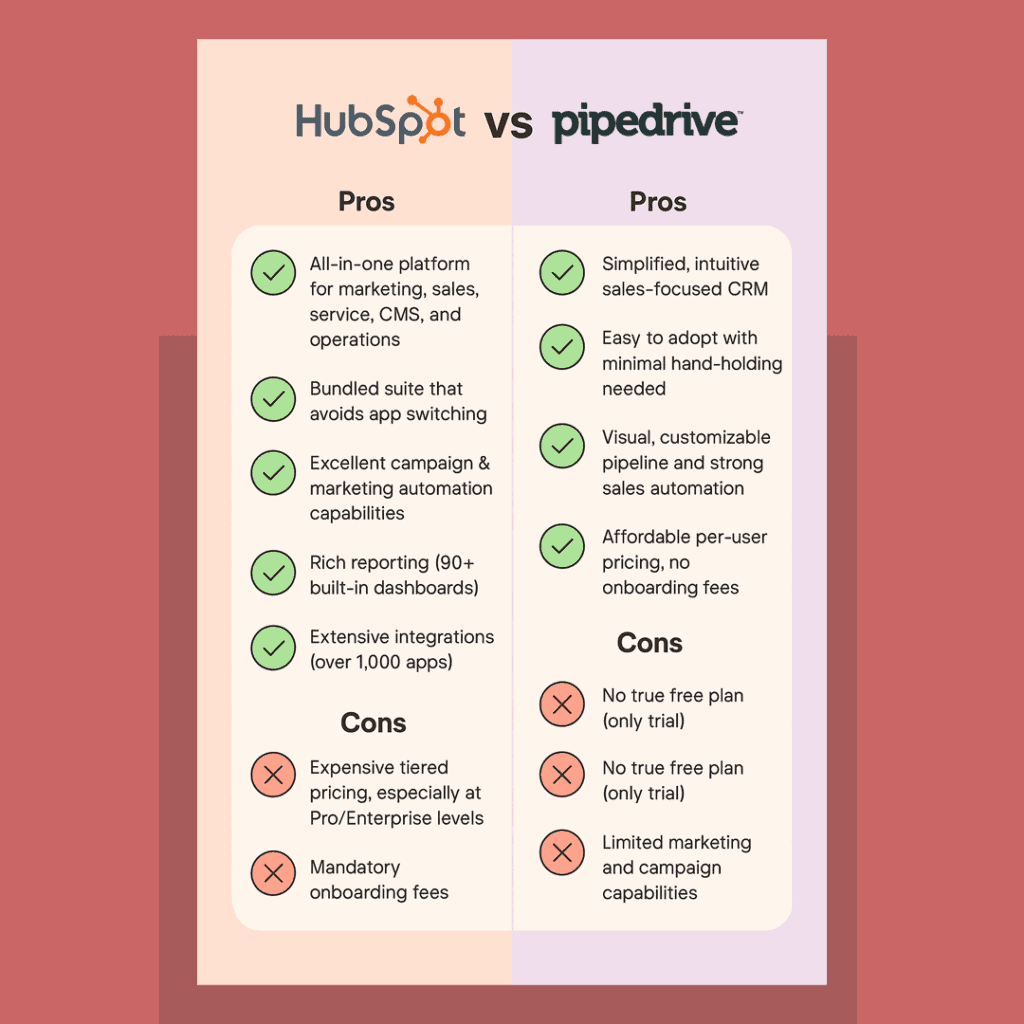
HubSpot vs Pipedrive pros and cons
What Is HubSpot CRM in 2026?
HubSpot is an all-in-one CRM platform that combines sales, marketing, service, operations, and content management into a single ecosystem.
In 2026, HubSpot strongly emphasizes AI-driven CRM workflows, including:
-
Predictive deal insights
-
Automated content creation
-
Smart lead scoring
-
AI-powered email drafting
-
Cross-hub automation
HubSpot offers a free CRM plan with unlimited users, making it attractive for startups, while advanced automation is available in paid tiers.
Best for:
Marketing-driven businesses, scaling startups, SaaS companies, and teams that want one unified CRM platform.
What Is Pipedrive CRM in 2026?
Pipedrive is a sales-focused CRM built around pipeline management and deal tracking.
Its core strength remains ease of use, offering:
-
Visual deal pipelines
-
Activity-based selling
-
Sales forecasting
-
AI Sales Assistant for follow-ups and next-best actions
As one user noted: ‘Very little hand‑holding is needed… Pipedrive solves adoption by being so easy to use’ — illustrating the HubSpot vs Pipedrive ease‑of‑use gap.
Its sales automation automates most of the repetitive sales tasks you can think of. For example, when you mark an activity as done, Pipedrive automatically moves the deal to another stage and creates a follow-up email.
Unlike HubSpot, Pipedrive does not offer a free plan and focuses primarily on sales teams rather than full marketing automation.
Best for:
Small sales teams, SMBs, and companies needing a lightweight CRM without marketing complexity.
Overall verdict (2026):
Choose HubSpot if you want a unified, AI-driven CRM that connects marketing, sales, service, and operations in one ecosystem.
In 2026, HubSpot stands out for teams that need predictive insights, automated content and emails, smart lead scoring, and cross-hub automation—without juggling multiple tools.
Its free CRM with unlimited users makes it accessible for startups, while paid tiers support fast-scaling, marketing-led businesses and SaaS teams that want everything in one place.
Choose Pipedrive if your primary goal is simple, effective sales execution.
It excels at visual pipelines, deal tracking, and activity-based selling, with an interface that requires minimal onboarding.
Pipedrive’s AI Sales Assistant and sales automations help sales reps stay focused on closing deals, but it’s best suited for teams that don’t need built-in marketing or a broader CRM ecosystem.
In short: HubSpot is built for growth and cross-team alignment, while Pipedrive is ideal for lean sales teams that value speed, simplicity, and adoption over all-in-one complexity.
Read also: HubSpot Pros And Cons — A Candid Assessment
If you’ve got no time to read this comprehensive blog post, you can just sit back and watch our video comparing HubSpot and Pipedrive:
HubSpot vs. Pipedrive – Decoding the Battle in 2026!
Comparing HubSpot vs Pipedrive: Features, Automations & Reporting (2026)
To help you decide between HubSpot and Pipedrive, we’ll compare them across eight critical factors that directly impact day-to-day usage, scalability, and ROI. Each platform is evaluated based on real-world usability, automation depth, reporting strength, and overall experience in 2026.
Comparing HubSpot vs Pipedrive: Ease of use
HubSpot vs Pipedrive: Ease of Use
Ease of use plays a major role in adoption. The faster your team can get comfortable with a CRM, the quicker you’ll see results. When comparing HubSpot vs Pipedrive, it’s important to assess:
-
How easily the CRM can be configured to match your workflows
-
How responsive and accessible customer support is during trials and live usage
-
How intuitive it is to build automations and use core features without heavy training
Pipedrive: Built for Fast Sales Adoption
Pipedrive is designed with one clear goal—helping sales teams close deals faster. From the moment you log in, the deal pipeline takes center stage, making it immediately clear what needs attention.
The visual pipeline allows sales managers to track activities, monitor deal progress, and customize pipeline stages to match their sales process. Activity-based selling ensures reps always know the next action to take.
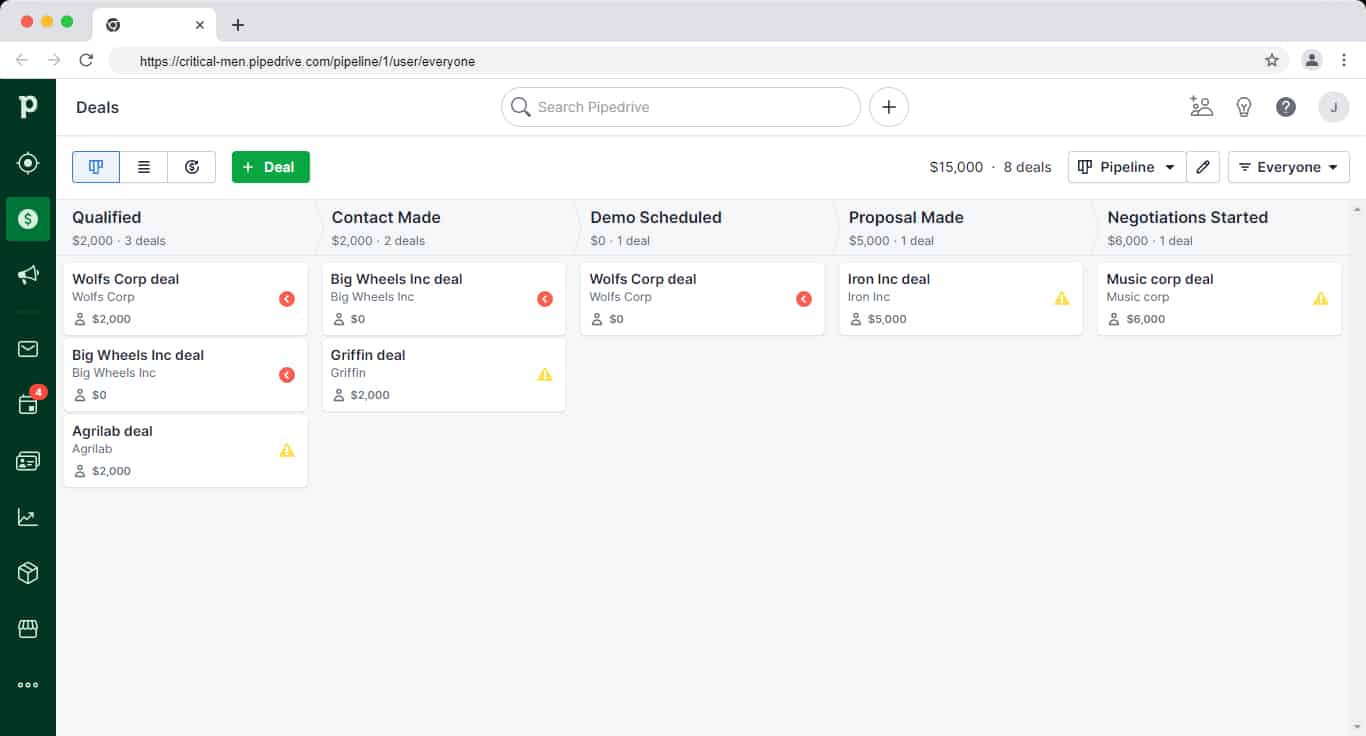
Pipedrive also integrates easily with popular sales and productivity tools, allowing teams to automate routine tasks without complexity.
All essential areas—leads, deals, contacts, reports, and campaigns—are accessible from a clean left-hand navigation panel. Built-in tutorials, contextual tips, and product walkthroughs help new users get started quickly, reducing onboarding time significantly.
As Eric J, head of sales, says:
“Very little hand-holding is needed to get your team ramped and up and running using Pipedrive. Adoption is a huge problem Pipedrive solves because it’s so easy to use there’s no reason not to use it.”
Pipedrive’s help center includes detailed step-by-step guides, and in-app chat support is available directly within the platform, with responses typically arriving within minutes.
Read also: HubSpot Pricing and Comparison with Affordable Alternatives
HubSpot: Powerful, Unified—but More Complex
HubSpot combines multiple tools across sales, marketing, service, operations, and content, so its interface naturally feels more feature-dense than Pipedrive’s.
That said, HubSpot’s top navigation bar makes it easy to switch between hubs, and each hub includes structured dropdowns for quick access to core features. For example, within the Sales Hub, users can jump directly to deals, tasks, forecasts, meetings, or documents without digging through menus.
Teams that use multiple HubSpot hubs benefit from having everything connected in one system—contacts, conversations, automation, and reporting all live in the same ecosystem.
As Aneesha Nair, Account Manager at SurveySparrow says:
“HubSpot helps us make things organized and as everything is one tool, it becomes easy to navigate and reach out to the right leads and update things accordingly.”
HubSpot’s support ecosystem is robust, offering detailed documentation, live chat, ticket-based support, and an active user community for troubleshooting and best practices.
Ease of use verdict (2026):
Tie—but with different strengths.
Both HubSpot and Pipedrive score highly on usability. Pipedrive wins on simplicity and speed of adoption, especially for sales-only teams. HubSpot requires a slightly higher learning curve, but rewards users with a unified, cross-team experience once set up—making it a strong choice for growing, multi-department organizations.
Read also: EngageBay vs HubSpot — Market Leader or Emerging Powerhouse?
HubSpot vs Pipedrive: Pricing Comparison (2026)
CRM Pricing Breakdown
| Feature | HubSpot | Pipedrive |
|---|---|---|
| Free Plan | ✅ Free CRM (unlimited users) | ❌ No free plan |
| Entry Paid Plan | Starter plans from ~$15/user/month | Plans from ~$14/user/month |
| Marketing Automation | Included (higher tiers) | Add-ons only |
| Onboarding Fees | Yes (for higher tiers) | No |
Summary
In 2026:
HubSpot stands out for its free CRM with unlimited users and its depth of automation across sales, marketing, and service. However, costs rise quickly as teams move into higher tiers to unlock advanced AI, automation, and multi-hub functionality, and required onboarding fees at higher plans can add notable upfront expenses.
Pipedrive follows a simpler, per-user pricing model with no free plan but predictable monthly costs. It includes core sales features—such as visual pipelines, AI-assisted follow-ups, and custom dashboards—across its paid tiers, making it a more budget-friendly option for small and mid-sized sales teams that don’t need built-in marketing automation.
Ultimately, the difference comes down to scope. HubSpot uses a bundled, multi-hub pricing structure designed for growing, cross-functional teams, while Pipedrive offers a single, sales-centric pricing model focused on ease of use and cost clarity.
Pipedrive vs HubSpot: Which is Better?
Pipedrive Pricing (2026)
Pipedrive follows a simple, per-user pricing model with no free plan. All plans are designed specifically for sales teams and scale based on automation, reporting, and support needs.
Essential — from ~$14 per user/month
This entry-level plan covers the basics of sales management, including deal and lead tracking, pipeline visibility, and standard reporting. It’s suitable for teams that want a lightweight CRM without automation complexity.
Advanced — from ~$29 per user/month
The Advanced plan adds email integration and tracking, along with basic workflow automation to reduce manual sales tasks. It’s ideal for growing sales teams that need better follow-ups and process consistency.
Professional — from ~$59 per user/month
This tier unlocks more powerful sales capabilities, including revenue forecasting, advanced reporting, document management, and enhanced collaboration tools. It’s designed for teams that rely heavily on data-driven sales decisions.
Enterprise — from ~$79 per user/month
The Enterprise plan includes priority support, enhanced security and permissions, and dedicated onboarding assistance. It’s best suited for larger sales teams that need advanced controls and hands-on setup support.
Pipedrive’s pricing remains predictable and sales-focused, but teams that need built-in marketing automation or a broader CRM ecosystem may need to factor in paid add-ons or consider alternatives.
Want to find a more affordable solution to Pipedrive? Our article on the top Pipedrive alternatives will help you make the right choice.
Read also: CRM Showdown — HubSpot vs Zoho Review and Comparison
HubSpot Pricing (2026)
HubSpot’s pricing in 2026 is based on individual hubs (Marketing, Sales, Service, CMS, Operations) combined with a seat-based access model. While HubSpot still offers a free CRM, paid plans scale quickly as teams unlock automation, AI, and advanced reporting.
HubSpot Paid Plans (Per Hub)
Starter — from ~$15 per core seat/month
Starter plans are available across hubs and include essential CRM features, basic automation, and limited customization. This tier is best for small teams that need core functionality without advanced workflows.
Professional — from ~$890/month (per hub)
Professional plans unlock advanced automation, AI-powered tools, deeper reporting, and personalization features. Pricing increases based on marketing contacts, additional hubs, and required core seats. Mandatory onboarding fees may apply.
Enterprise — from ~$3,600/month (per hub)
Enterprise plans are designed for large teams and include advanced permissions, custom reporting, predictive analytics, and AI-driven insights across sales and marketing. This tier typically requires higher onboarding and annual commitments.
HubSpot’s pricing gets expensive very fast and lacks some key features on some plans.
What Becomes Clear About HubSpot Pricing
-
Costs rise quickly as soon as you move beyond basic CRM usage
-
Advanced automation and AI features are locked behind Professional and Enterprise tiers
-
Pricing compounds across hubs, seats, and contacts—not just users
-
Annual commitments and onboarding fees add to upfront investment
HubSpot Seat Model (2026)
HubSpot now separates access by seat type:
-
View-Only Seats – Free and unlimited, but restricted to read-only access
-
Core Seats – Paid seats required for creating, editing, and automating workflows
-
Sales & Service Seats – Required for advanced sales and support features
This means teams that previously relied on free edit access must now purchase Core seats, increasing total costs as usage grows.
As Daniel Fernandez, account executive at Lotus Connect says:
“I think that the pricing structure could work differently. Luckily, I work at a company that can afford the professional accounts but I do think that the price increase is way too steep and some of the features, namely sequences, should be available on the less expensive plans.”
HubSpot 2024 pricing update: In March 2024, HubSpot introduced two new seats, View-Only and Core. The View-Only seats are unlimited and free but offer view-only access to all the features in the particular subscription. The Core seats are paid and offer edit access to the Core features of the chosen plan. Keep in mind that the new paid Core seat functionality was previously offered in the free plan, meaning HubSpot just got expensive. This table can help you understand better:
| User requirement | Previous pricing structure | New pricing structure |
| Users requiring view-only access to reports, records, and other data | Included in the free plan | Now offered in the free, View-Only seat |
| Users requiring edit access to records and reports, email tracking, and other editable tasks | Included in the free plan | Now offered in the paid, Core seat |
| Users requiring sales and service-specific features | Dedicated Sales and Service seat | Dedicated Sales and Service seat |
Pricing verdict:
HubSpot delivers powerful, AI-driven functionality—but at a premium. Its pricing model favors fast-growing or well-funded teams that want a single platform across departments and can absorb rising costs.
For comparison, Pipedrive’s per-user pricing grows more gradually and remains easier to predict, making it the more cost-effective option for sales-focused teams that don’t need bundled marketing or multi-hub automation.
👉 Don’t settle for HubSpot’s high prices. Check out our article on the best HubSpot alternatives for a better deal.
Read also: Is HubSpot CRM Free? An Unbiased Guide (with User Reviews)
Comparing HubSpot vs Pipedrive: Customization & Pipeline Management (2026)
When comparing HubSpot vs Pipedrive in 2026, both platforms offer strong customization and pipeline management—but they excel in different ways.
HubSpot prioritizes flexibility across teams and objects, while Pipedrive focuses on speed, clarity, and sales execution. What one platform gains in breadth, the other wins in simplicity.
Pipedrive: Sales-First Pipeline Customization
Pipedrive allows teams to create custom fields, design multiple pipelines, and fully customize deal stages to match their sales process. Its visual pipeline remains one of the strongest in the CRM market, giving sales reps an instant overview of deal status, next actions, and bottlenecks.
In 2026, Pipedrive also supports:
-
Custom reports and dashboards
-
Sales-focused workflow automations (deal movement, task creation, follow-ups)
-
AI-assisted deal insights and activity recommendations
While reporting and automation are more limited compared to HubSpot’s cross-hub capabilities, they are more than sufficient for most SMB sales teams and easier to configure without admin-heavy setup.
Pipedrive’s strength lies in pipeline hygiene and usability—teams can quickly move deals, log activities, and keep pipelines clean without friction.
Read also: AWeber vs Mailchimp and Other Email Tools
HubSpot: Deep Customization Across the CRM
HubSpot offers far deeper customization than Pipedrive, especially for teams managing complex data across marketing, sales, and service.
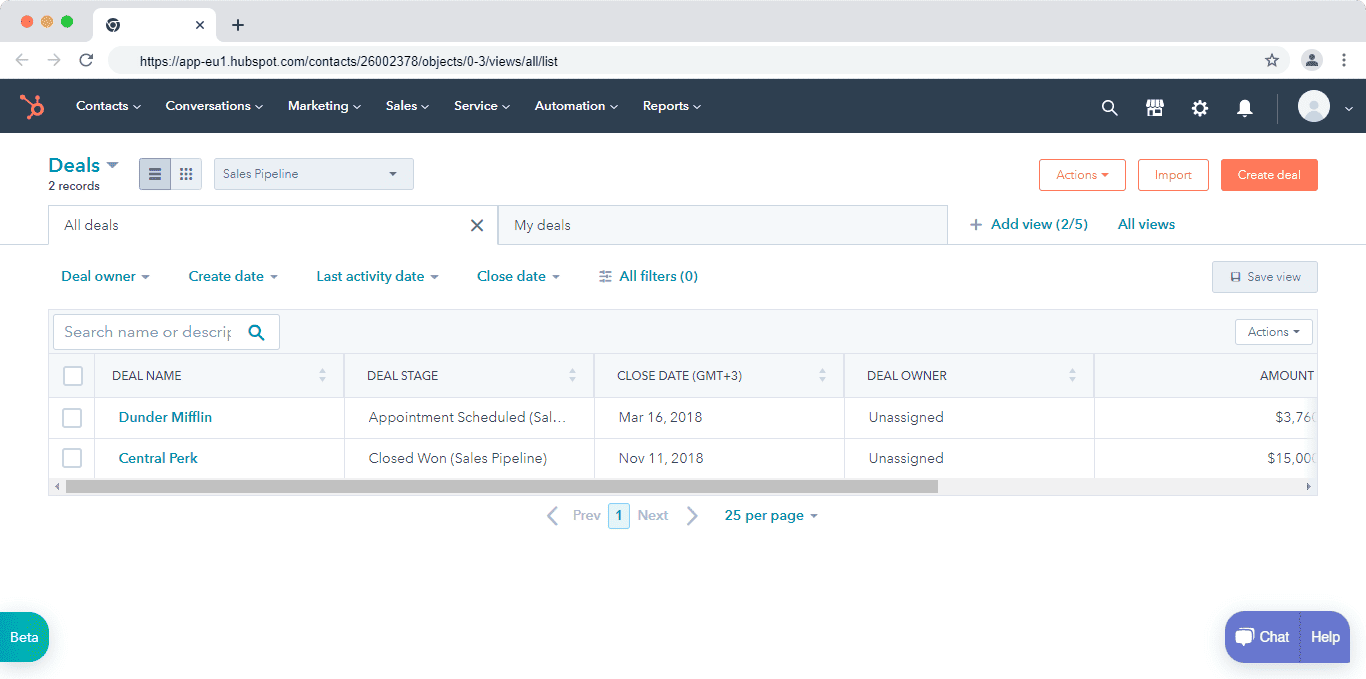
However, its pipeline management could be improved. Its bad UX, for example, makes it hard to progress a deal to a customer.
In 2026, HubSpot supports:
-
Highly customizable CRM objects and properties
-
Advanced custom reports and forecasting
-
Cross-hub workflows spanning sales, marketing, and service
-
AI-driven automation and predictive insights
However, this flexibility comes with trade-offs. HubSpot’s deal pipelines are powerful but can feel heavier and more complex, particularly for sales reps who only need quick pipeline updates. Moving deals, managing stages, and configuring automations often requires more upfront setup and admin involvement than Pipedrive.
Here’s how Damien Frye, an enterprise sales representative at WordRake, sums it up:
“I’ve managed several CRM programs as an admin, and HubSpot is my top choice. … It offers a prompt support crew, an excellent knowledge base, and ease of use.” — Winston A., Mid‑Market (51–1000 employees)
Customization and pipeline management verdict (2026):
-
Customization: HubSpot wins with broader, deeper configuration options
-
Pipeline management: Pipedrive wins with a cleaner UX and faster sales execution
In short, HubSpot is better for teams that need flexibility across departments, while Pipedrive is better for teams that live and breathe sales pipelines.
Read also: HubSpot vs Mailchimp — A Complete Product Comparison
Comparing HubSpot vs Pipedrive: Marketing & Campaign Management (2026)
Both HubSpot and Pipedrive offer campaign-related capabilities, but they are built for very different use cases. The difference stems from their core focus: HubSpot is a full-funnel marketing platform, while Pipedrive is a sales-first CRM with email outreach tools.
Pipedrive: Sales Email & Outreach Campaigns
Pipedrive’s marketing features are designed to support sales-led communication, not dedicated marketing teams.
In 2026, Pipedrive allows you to:
-
Create and send sales emails using a built-in email editor
-
Use pre-built email templates for faster outreach
-
Segment contacts for targeted sales campaigns
-
Track opens, clicks, and replies at the contact and deal level
-
View email history directly inside each contact and deal record
These capabilities work well for one-to-one or small-batch sales campaigns, follow-ups, and pipeline-driven outreach. However, Pipedrive does not offer native marketing automation, landing pages, advanced A/B testing, or multi-channel campaign orchestration. Teams typically rely on add-ons or third-party tools for those needs.
In short, Pipedrive’s “campaigns” are sales campaigns—not full marketing programs.
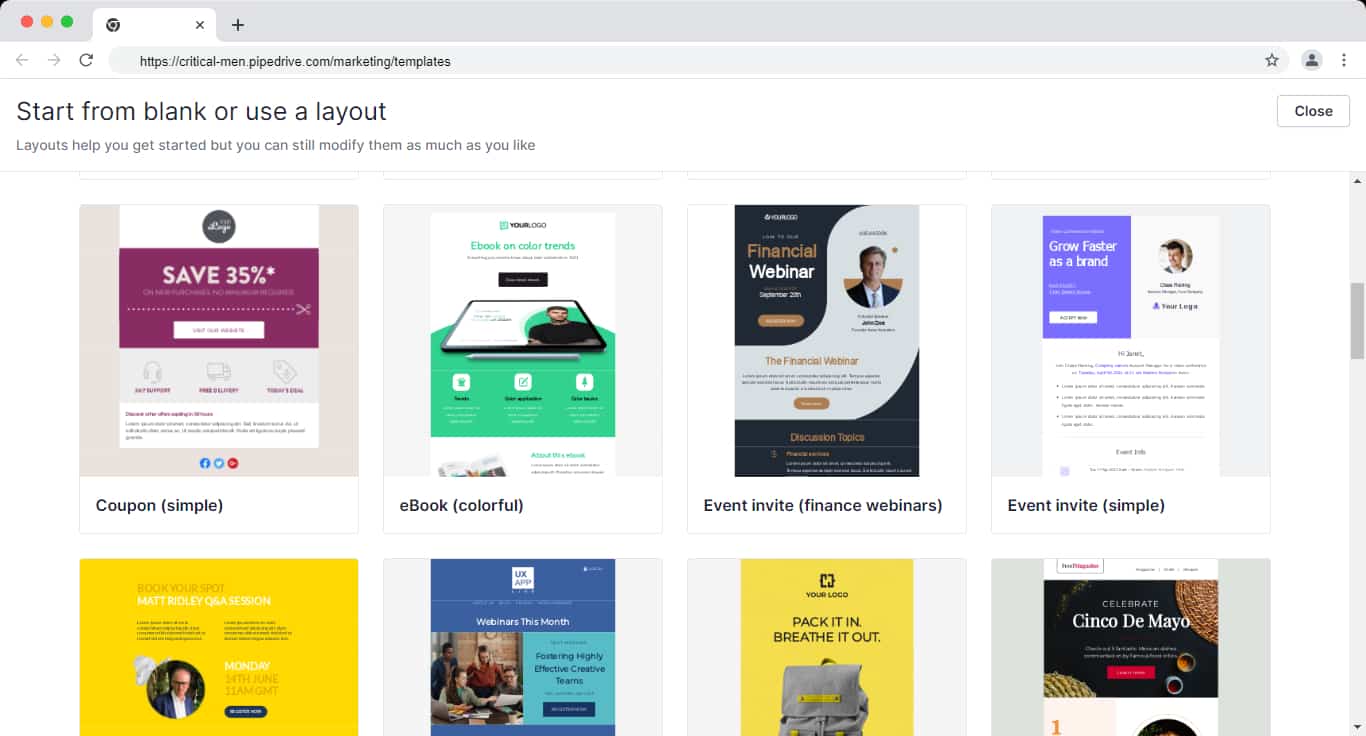
HubSpot: Full-Funnel Marketing & Campaign Orchestration
HubSpot provides a comprehensive marketing platform built for teams running multi-channel, data-driven campaigns.
In 2026, HubSpot enables you to:
-
Create blogs, landing pages, forms, and CTAs
-
Run email marketing with A/B testing and automation
-
Manage paid ads and social media from one dashboard
-
Build lead-nurturing and lifecycle-based workflows
-
Attribute revenue and performance across channels
HubSpot’s campaign management feature lets marketers group all related assets—emails, ads, landing pages, workflows, and content—under a single campaign goal. This makes it easy to track performance at both the asset level and the overall campaign level.
For example, a seasonal campaign like Black Friday can include emails, ads, landing pages, blog content, and automated follow-ups, all tied to one measurable objective.
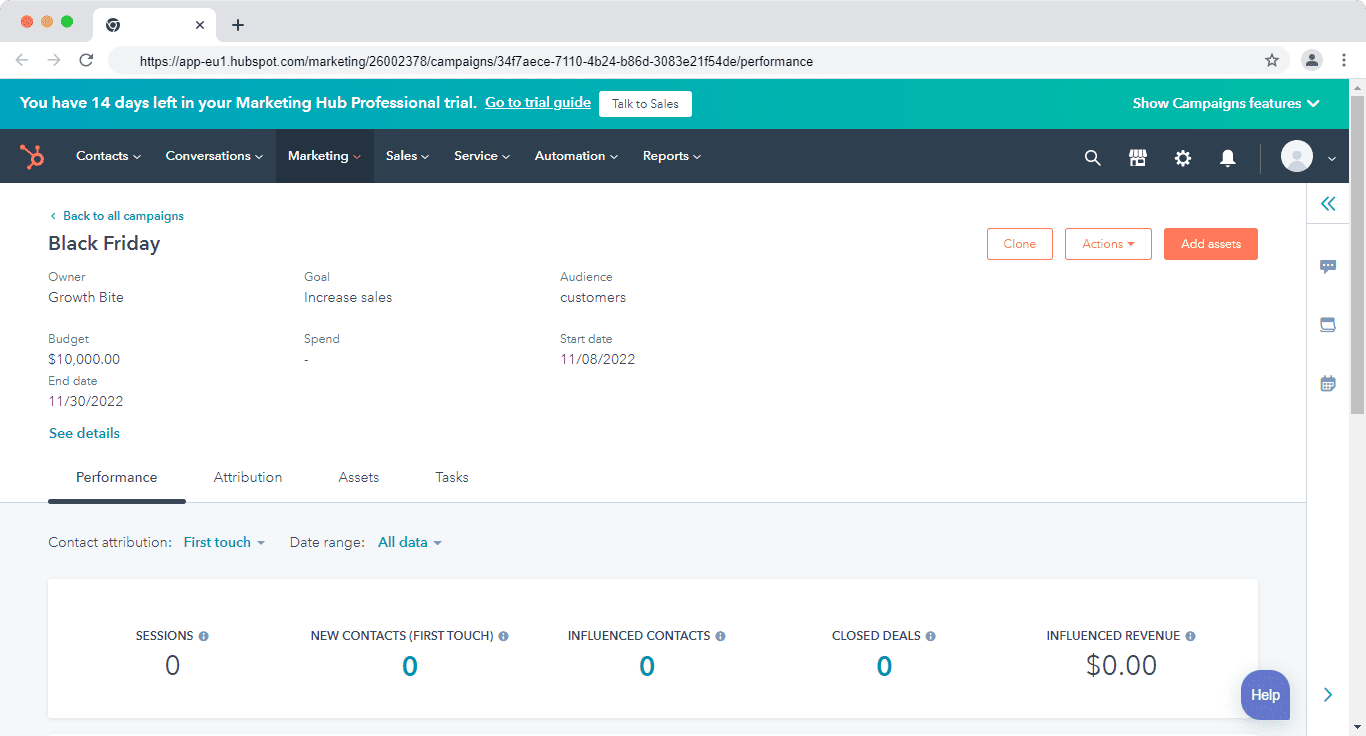
Here’s how Krishna Raj a digital marketing strategist summed up HubSpot:
“Before the implementation of HubSpot, we were using multiple tools for all marketing activities, now with this single platform we can have email marketing, marketing & sales automation, social media posting analysis, website analytical reporting, and leads nurturing everything can be done under this single platform.”
Marketing and campaign management verdict (2026):
HubSpot clearly leads in marketing and campaign management, offering full-funnel automation, attribution, and multi-channel orchestration.
Pipedrive is sufficient if your needs are limited to sales emails and basic outreach—but it’s not designed to replace a dedicated marketing automation platform.
Read also: The Definitive Pipedrive vs Salesmate Review — Which is The Best CRM Solution?
Comparing HubSpot vs Pipedrive: Integrations (2026)
CRM integrations play a critical role in eliminating data silos and connecting sales, marketing, and support workflows across your tech stack.
Both HubSpot and Pipedrive integrate with popular business tools—but the scale and depth of their ecosystems differ.
Pipedrive: Strong Sales & Productivity Integrations
In 2026, Pipedrive offers 400+ native integrations, primarily focused on sales productivity and deal execution.
It integrates seamlessly with tools across:
-
Email and calendar platforms
-
Accounting and invoicing tools
-
Customer support and live chat software
-
Marketing and outreach tools
-
Calling and telephony solutions
Popular integrations include Slack, PandaDoc, Intercom, Zendesk, Google Workspace, Microsoft 365, and popular calling tools.
For apps not available natively, Zapier and Make enable no-code workflows—for example, automatically syncing Facebook Lead Ads or form submissions into Pipedrive as new deals or contacts.
Pipedrive’s integrations are easy to configure and well-suited for sales teams that want fast setup without complex dependencies.
HubSpot: One of the Largest CRM Integration Ecosystems
HubSpot’s App Marketplace includes 1,500+ integrations in 2026, spanning nearly every business function.
HubSpot integrates deeply with:
-
Marketing and advertising platforms
-
Sales enablement and revenue tools
-
Customer support and success software
-
Finance, billing, and payments
-
Product, data, and analytics platforms
It also supports two-way integrations with other CRMs, including Salesforce, Pipedrive, Copper, and Insightly—useful for hybrid or phased CRM migrations.
Because HubSpot connects marketing, sales, service, and operations in one system, its integrations often go beyond basic data sync and support cross-tool automation, attribution, and reporting.
Integration verdict (2026):
Slight edge to HubSpot.
Both platforms integrate well with popular tools, but HubSpot offers a broader and deeper ecosystem, especially for marketing, analytics, and revenue operations.
Pipedrive’s integrations are more than sufficient for sales-focused teams, offering simplicity and speed without the complexity of enterprise-grade integration setups.
Comparing HubSpot vs Pipedrive: Sales automation
Automations and workflows improve your team’s productivity by eliminating manual work and repetitive tasks.
Pipedrive
It has a workflow builder where you can create automations on some of the most repetitive tasks. You can also pick from the list of pre-built automations such as when a deal moves to a new stage, it creates an activity.
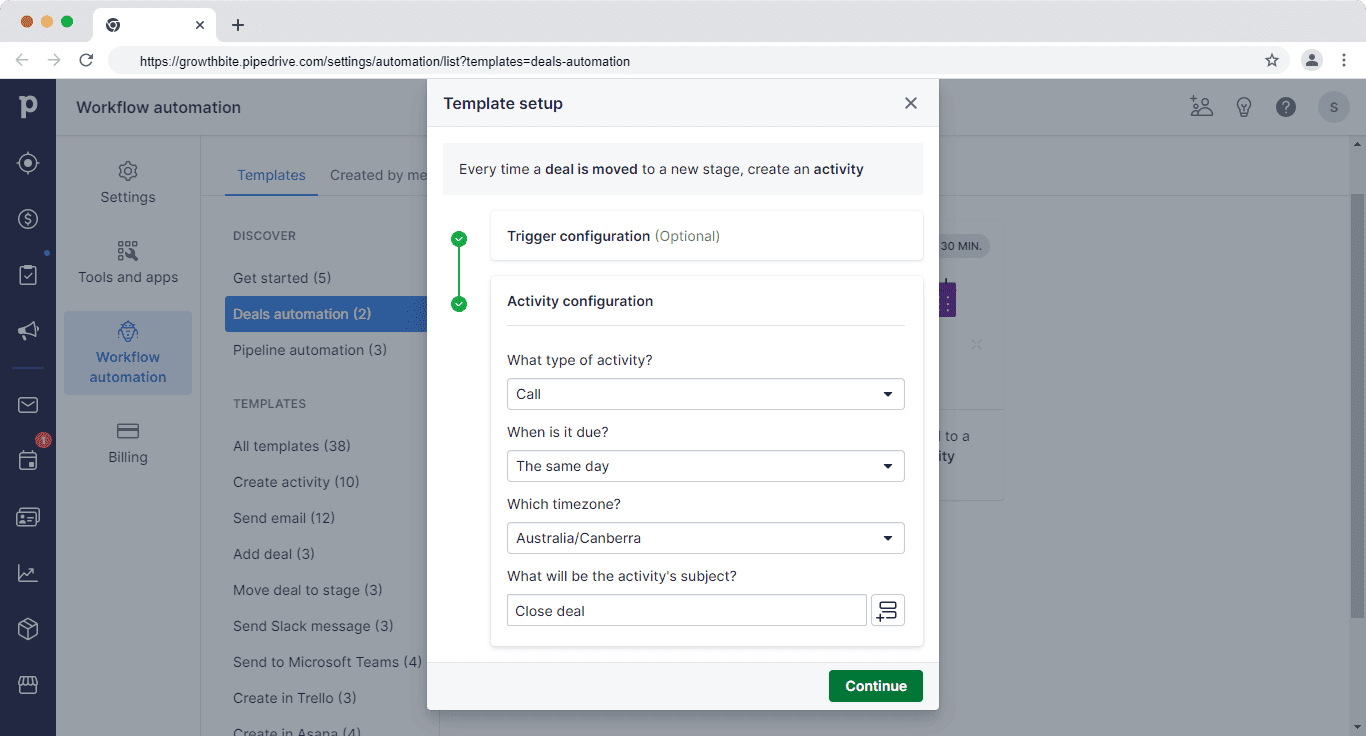
Other than the templates, you can build automation from scratch. Although some customers say the workflow builder is limited.
Here’s how Sasha Trifkovic, CEO of Dawn Media summed it up:
“I absolutely hate the automation in Pipedrive. Although they serve a simple purpose like converting leads into deals or setting up a notification. They are too simple for us who want sophisticated automation.”
You can also use its AI sales assistant to analyze past performances and notify you of ways to improve your sales workflow. It can also suggest features that you might have missed and could help you close more deals.
Redefining CRM Standards! Pipedrive Review 2024
HubSpot
HubSpot automation is based on two features–sequences and workflows.
Sequences ensure no deal falls through the crack. You can create a series of timed emails to nurture leads and follow up with deals. Personalize the sequence emails using contact and company data from HubSpot CRM and Salesforce.
Workflows automate manual and time-consuming activities. Some tasks you could automate include nurturing leads, updating leads’ lifecycle stages, and handing off leads to sales.
HubSpot also has seven types of triggers that start a workflow–contact-based trigger, company-based, deal-based, ticket-based, quote-based, conversation-based, and feedback-submission based.
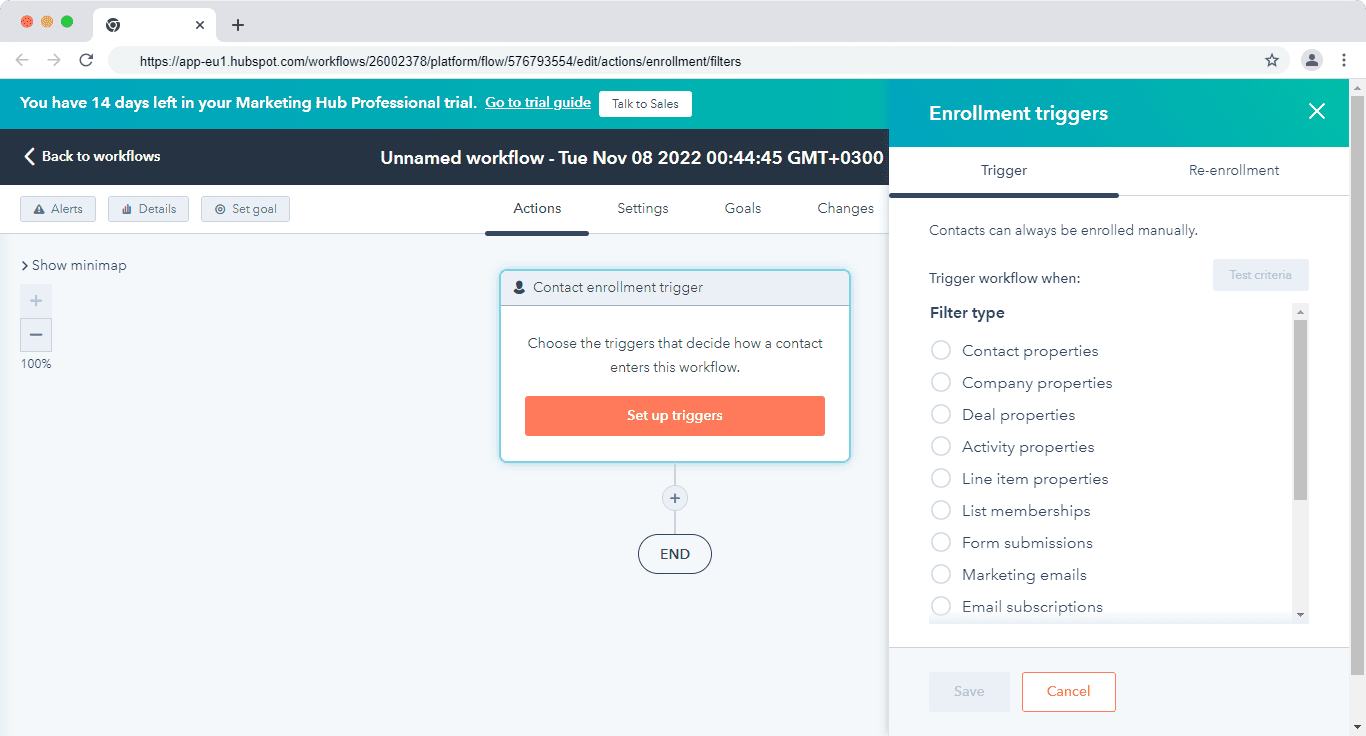
You can also pick automation from the pre-built list. This list has automations for converting leads, sharing meeting details, promoting something, and many more.
Sales automation verdict:
When comparing HubSpot vs Pipedrive, it is evident that HubSpot has better sales automation. Pipedrive can save you time by running simple automations, but with HubSpot, it depends on your imagination and how far you see an automation running.
Read also: 6 Perfect Pipedrive Alternatives With Better Tools
Comparing HubSpot vs Pipedrive: Reporting
CRM reporting helps you know what’s happening across your sales process and how each team member is performing.
Here are some details you can look out for:
- How easy it is to create reports and dashboards
- The type of reports available
- How presentable and easy to understand the reports are
Pipedrive
Pipedrive gives you a visual overview of your sales team’s activity and deals. You can set goals based on deals, activities, and revenue forecasts and assign these goals to reps.
The forecast view also helps you understand revenue projections for the company. It basically projects based on the expected close date of the deals.
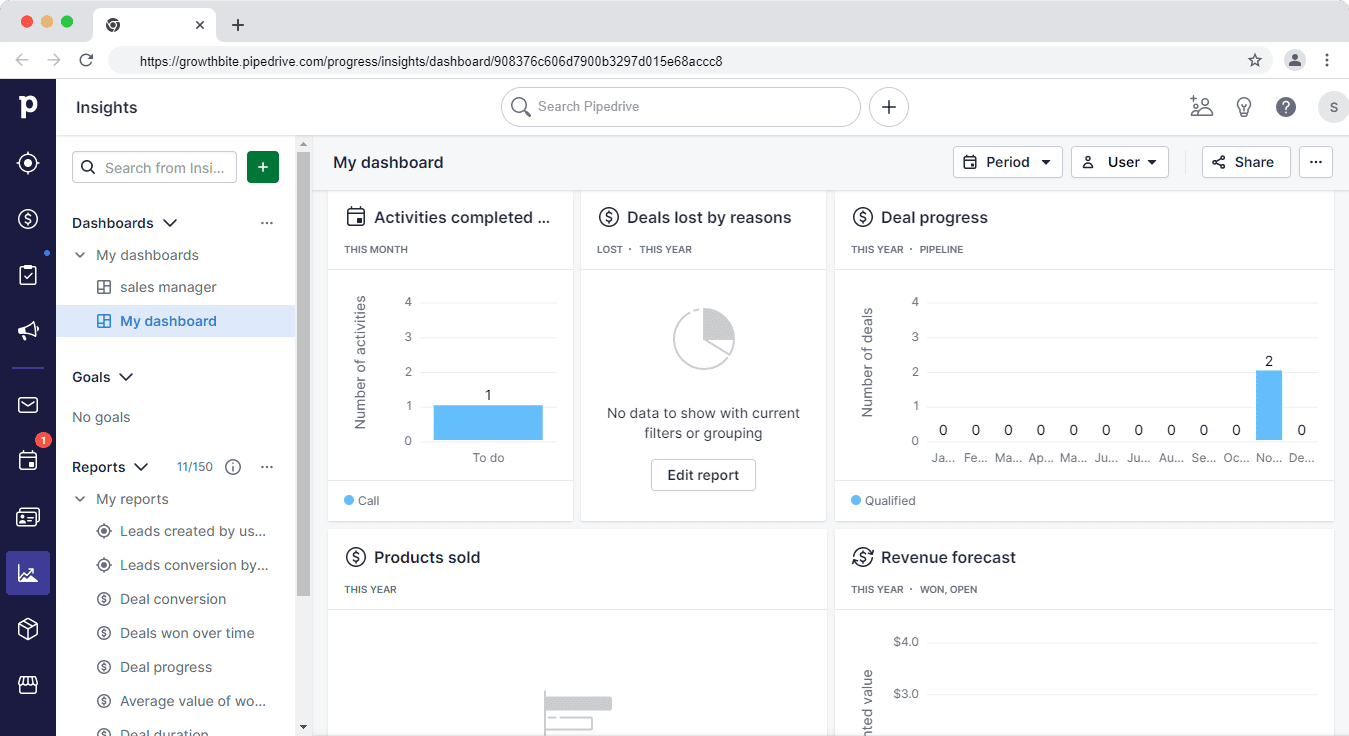
Key reporting features include:
- Team reporting where you measure reps’ performance against set goals and KPIs
- Track deals from the initial stages to when they close
- Individual dashboards for reps
- Basic customization
From a recent G2 review: “What I like best about Pipedrive is its user‑friendly and intuitive interface … visual pipeline that allows for simple drag‑and‑drop deal tracking. It offers great customization options … useful automation features … mobile app is perfect for staying productive on the go.”
Read also: Pipedrive Pricing, Features, and Affordable All-in-One Alternatives
HubSpot
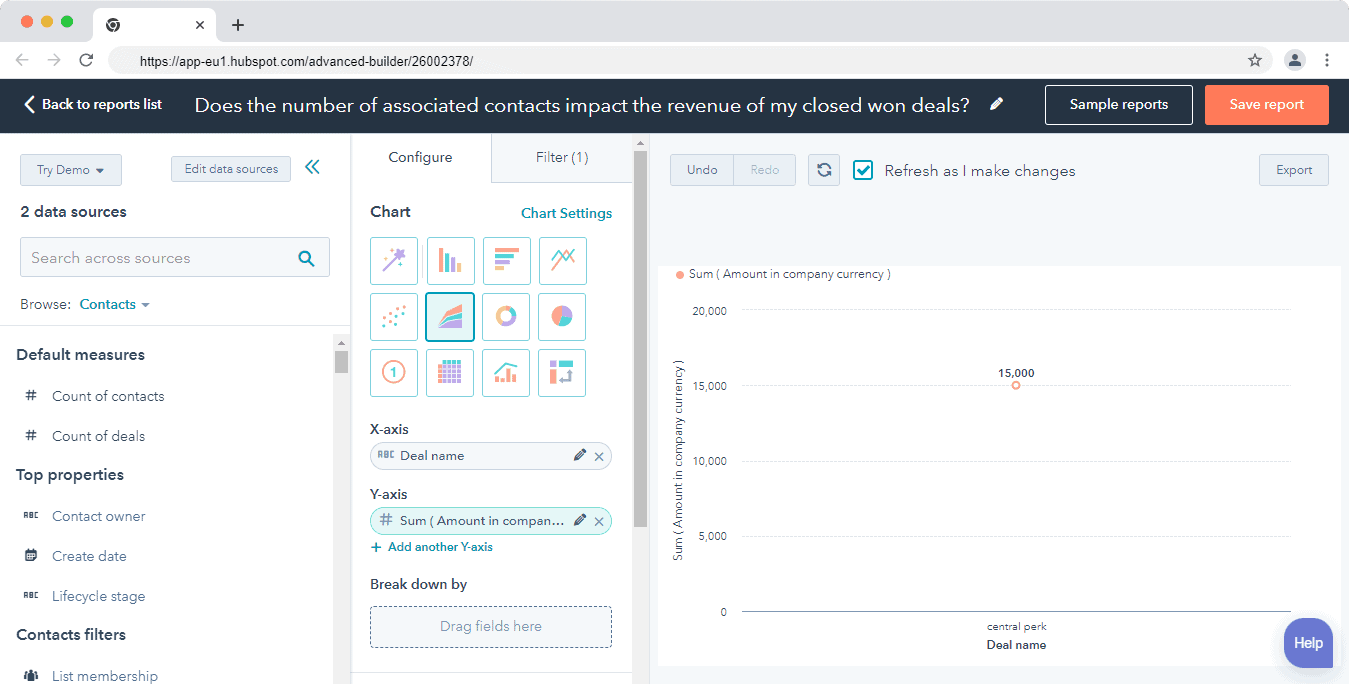
Its reports and dashboards are comprehensive and use the data from the CRM and marketing hub to provide insights into your pipeline, forecast revenue, and coach your team.
HubSpot has a list of 90+ pre-built reports built into dashboards. For example, the sales manager dashboard has 8 pre-built reports. Here are some of the reports:
- Deal closed total vs goal (deal management)
- Deal leaderboard – all-time amount closed by rep
- Activity leaderboard by rep with type breakdown
- Deals open by close date of this month
- And many others
Some dashboards that you might find useful are the sales opportunity review with 9 reports on the overall performance of your sales for the month and the sales dashboard, which has 5 reports that focus on your deals and sales.
You can also gain insights into the progress of deals and contacts in their respective life cycle stages using the funnel reports. You can also build custom reports to get insights based on your specific needs and help in presenting them to stakeholders.
Reporting verdict:
HubSpot has better reporting flexibility and functionality compared to Pipedrive.
Read also: Sales Analysis — Learn To Zoom In & Master the Pipeline
Comparing HubSpot vs Pipedrive: Lead management
Both Pipedrive and HubSpot have powerful lead management functionality. But they differ in features since one is an all-in-one software and the other a sales CRM.
Pipedrive
Pipedrive’s lead management software helps you to attract and nurture more leads.
Here are some of its key features:
- The lead inbox helps you store leads and add activities until your team is ready to qualify them
- The chatbot functionality helps you interact with prospects and attract leads
- Web forms that help you attract prospects that visit your website
- The smart contact data helps you import information about your lead from the web instead of manually researching your lead one by one
But the majority of these tools are add-ons that are paid separately from the CRM.
Here’s the pricing for the addons:
- Leadbooster add-on (includes live chat, chatbot, web forms, and prospector) – $39 per month
- Web visitors add-on – $49 per month
Read also: Pipedrive vs Close Comparison — Which CRM Is Right For You?
HubSpot
Its lead management software lets you view communication history, manage leads, and prioritize your leads all in one dashboard.
HubSpot’s smart contact database lets you see every detail about a lead from the contact’s profile. You can track the conversations and every touchpoint between them and the company, such as social media, tickets, and email.
Attract leads and nurture them using forms, live chat, and chatbots. Manage conversations with your leads in the universal conversation inbox that gives your sales, marketing, and support teams a place to engage with leads and customers.
Lead management verdict:
Tie. Both Pipedrive and HubSpot have great lead management functionality. When comparing HubSpot vs Pipedrive, we found that they both cover the entire lead management process from attracting leads to passing them to sales.
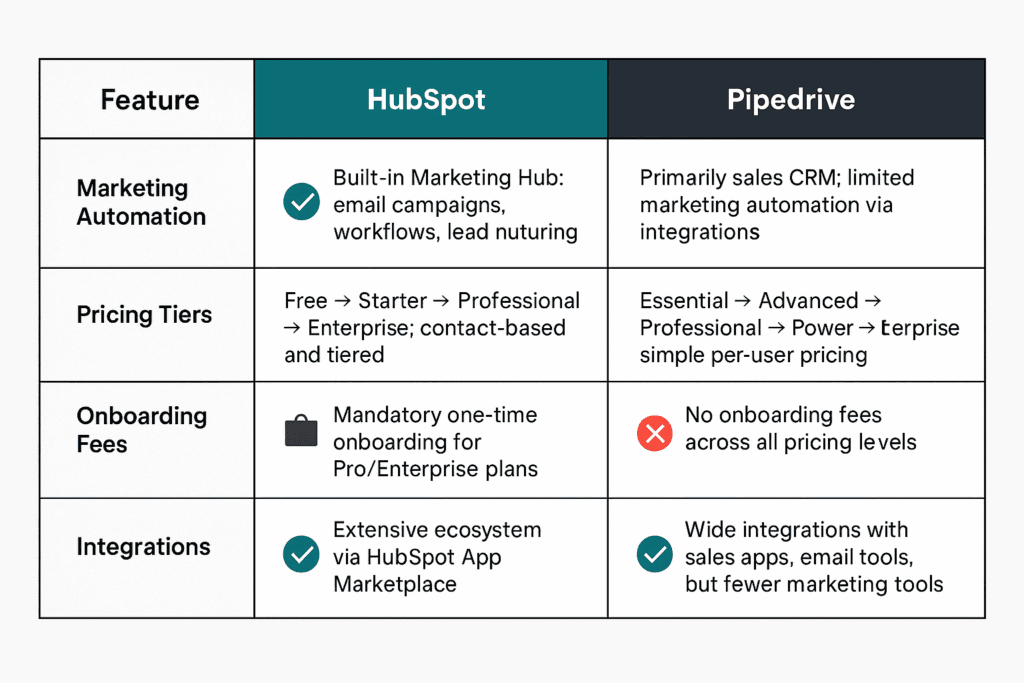
Comparison table showing HubSpot vs Pipedrive feature matrix
Read also: Pipedrive VS Monday — Which Is Better? A Side-By-Side Review
EngageBay: A More Affordable and Powerful Alternative
EngageBay is an all-in CRM powering sales, marketing, and support teams. It’s ideal for small businesses that are starting out or those that are scaling.
HubSpot packs advanced features and replaces standalone apps like marketing automation software, but it’s expensive. Pipedrive is cheaper, but it lacks key marketing features and it’s only suitable as a sales CRM.
EngageBay packs the best of both worlds. It’s cheap like Pipedrive and has advanced marketing, sales, and support features like HubSpot.
Here’s how Edo Modun, a sales specialist, summed up EngageBay:
“It’s very useful that you have a package with the most important tools such as CRM and email marketing as one service. Workflow is much easier, data flow is simpler and results are more visible. CRM has many options that you can only dream about in some other online solutions. The file repository is a nice touch.”
You can create multiple deal pipelines for different products, run automations with multiple triggers, and get deeper customer insights with a bird’s-eye view of the entire customer journey touchpoints.
The marketing automation platform lets you run drip campaigns, build forms and landing pages, automate lead scoring, and segment customers based on their activities and behavior.
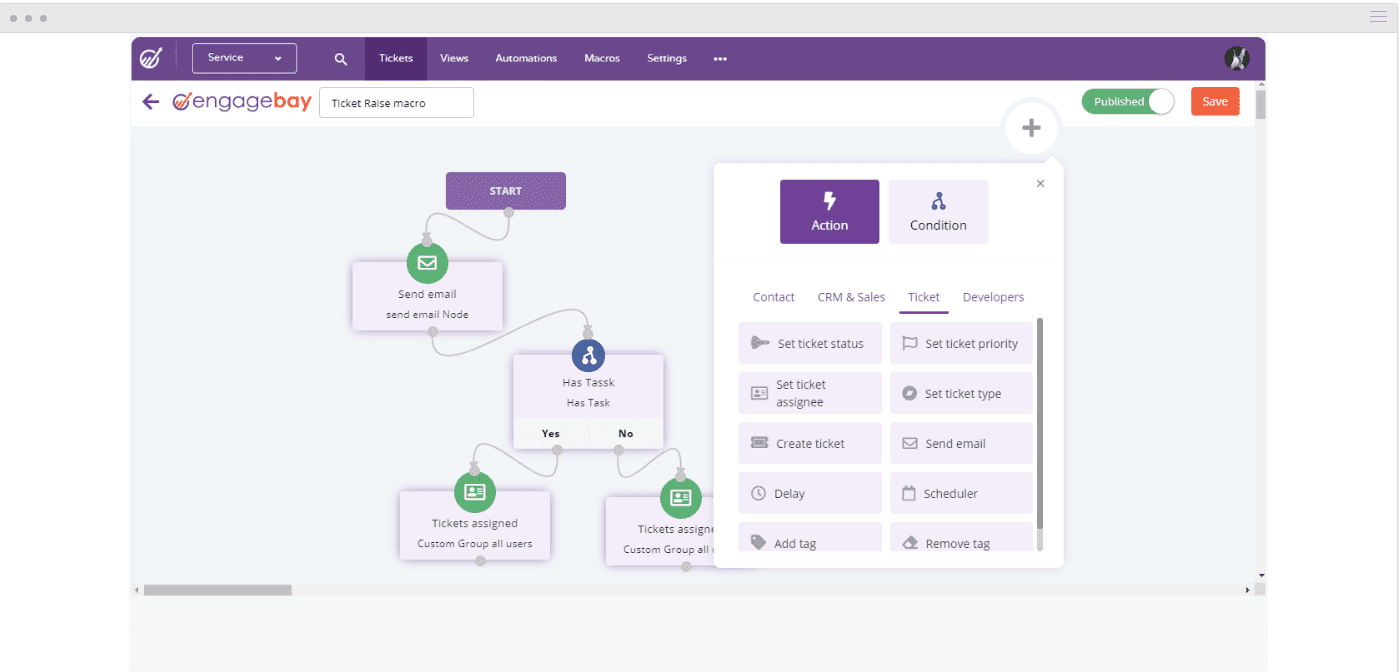
The free help desk and live chat software lets you engage with customers and provide contextual support. You get to run ticket automations, assign tasks to reps, and view customer interactions with the company on one dashboard.
Comparing HubSpot vs Pipedrive – Each is Best For:
HubSpot → All‑in‑one marketing + sales + service teams
Ideal if you need a comprehensive platform that integrates marketing automation, sales pipeline, support tools, and CMS in one ecosystem—best suited for organizations scaling beyond pure sales operations.
Pipedrive → Small or sales‑focused teams seeking pipeline efficiency
Great for teams primarily focused on closing deals—its intuitive, drag‑and‑drop pipeline and sales automation tools deliver focused functionality without the overhead of marketing or service modules.
Learn more about EngageBay:
Sign up with EngageBay for free
Wrapping up
Pipedrive is great for you if you only need a sales CRM to manage your deals and run essential sales automation.
As Michelle Moore puts it:
“Many of the current CRMs I’ve tested in the past were so comprehensive and thorough, but also so difficult to grasp, that they couldn’t be set. Pipedrive has a restricted number of points, which has made my job much easier.”
HubSpot is best for you if you need something more than just a CRM. But it can get expensive pretty fast.
If neither of the platforms seems a good fit, you can try EngageBay’s features with the free forever plan and evaluate whether it can serve your business needs.
Related reading:
- The best CRM Tools for Small Businesses
- The 14 Best CRM Automation Software in 2024
- 15 Best Marketing Automation Tools for Small Businesses
- Is HubSpot Worth It? In-Depth Review for Small Businesses
In HubSpot vs Pipedrive pricing, HubSpot has a steeper tiered pricing structure, with sliding contact‑based charges and mandatory onboarding fees. Pipedrive offers simpler, per-user pricing with no onboarding costs.
HubSpot provides a forever‑free CRM tier with basic tools and unlimited free view‑only users. Pipedrive does not offer a true free plan—only a limited-time trial—making HubSpot more appealing for startups looking for free tools.
Yes. HubSpot includes mandatory onboarding fees on its Professional and Enterprise plans, sometimes running into thousands of dollars. Pipedrive, on the other hand, does not charge any onboarding fees across its pricing tiers.
HubSpot’s pricing increases significantly as your contact list grows, with charges based on the number of marketing contacts. Pipedrive uses fixed per-user pricing, regardless of how many contacts are stored.
Pipedrive is generally more cost-effective for small or growing teams due to its straightforward per-user pricing. HubSpot, while feature-rich, becomes expensive quickly as you scale contacts or add premium tools.

