
HubSpot offers a “free forever” CRM—but is HubSpot actually free in 2026?
The short answer: yes, HubSpot has a free plan—but with strict limits that most growing teams hit faster than expected.
Well, as a small business owner, founder of an early-stage startup, or manager of a sales and marketing team, you surely feel the pulse of every single dollar you spend on tools that power your business operations.
You likely pay for customer service tools, project management tools, team collaboration tools, and productivity tools, and before you know it, expenses pile up.
At this point, adding a costly CRM tool to the mix doesn’t cut it. But if the tool is free, it makes your life a thousand times easier, right?
This is exactly why you want to know if the HubSpot CRM software is truly free.
In this guide, you’ll get our unbiased opinion about the HubSpot free forever plan which is rooted in cold hard facts.
In this guide, we break down exactly what HubSpot Free CRM includes in 2026, how many users and contacts you really get, what features are locked behind paid plans, and when upgrading becomes unavoidable.
Here are other details we’ll cover in this guide:
- The story behind HubSpot’s free CRM plan
- Review of HubSpot free CRM features
- 5 key limitations of HubSpot free CRM
- Who HubSpot free CRM plan is best for
- Who should stay clear of HubSpot’s free CRM plan
- The HubSpot CRM alternative that does more for less
Note: This a detailed guide — it’ll take some time to read through it. If you want a quick overview instead, watch Megan Grant’s video decoding HubSpot’s free plan.
Let’s get into it.
Table of Contents
What Does HubSpot Free CRM Include in 2026?
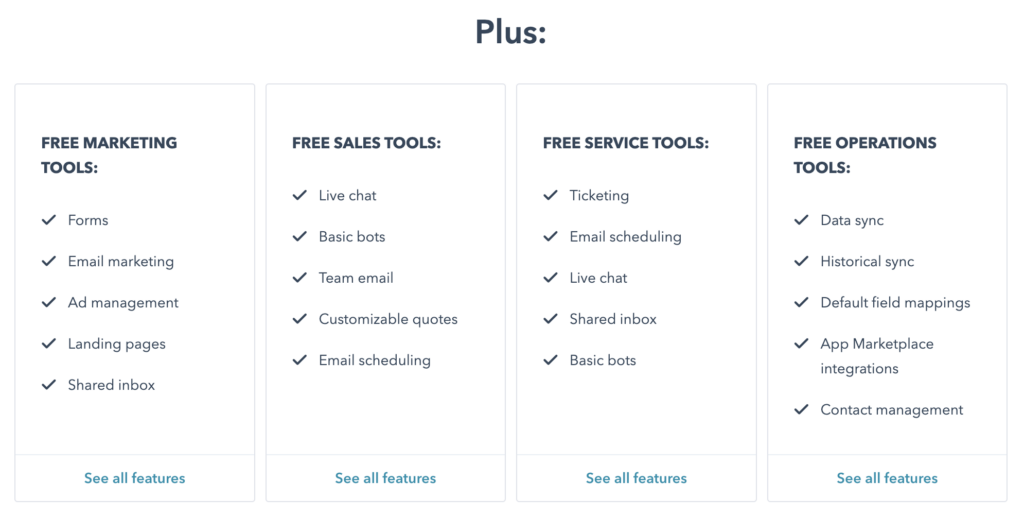
HubSpot’s Free CRM gives small teams basic tools for managing contacts, deals, and customer conversations—but it’s intentionally limited to encourage upgrades as your database, automation needs, or reporting requirements grow.
In 2026, the free plan works best for testing HubSpot or running very low-volume operations. Here’s what it actually includes.
🧰 Core CRM Capabilities (Free)
- Contact and company management (up to ~1,000 marketing contacts)
- Deal tracking with basic pipeline customization
- Shared inbox for team email conversations
- HubSpot-branded live chat and messaging
- Email tracking and open notifications (usage capped)
- Basic reporting dashboard with limited reports
- Standard contact and deal properties
- User access controls and team email connection
- Mobile CRM apps (iOS & Android)
- Basic event tracking and simple automation triggers
Advanced analytics, AI insights, custom objects, and granular permissions are available only on paid plans.
💼 Sales Hub Tools (Free)
- Single deal pipeline per account
- Basic deal stages and task tracking
- Email tracking and notifications (monthly limits apply)
- Limited email templates and canned snippets
- HubSpot-branded sales documents
- Meeting scheduling with one personalized booking link
- Quote creation (no eSignature, payments, or Stripe support)
- Slack integration for basic deal and activity alerts
Sequences, forecasting, automation, and revenue reporting require upgrades.
📣 Marketing Hub Tools (Free)
- Forms with HubSpot branding and submission limits
- Email marketing with HubSpot branding (up to ~2,000 sends/month)
- Simple landing pages hosted on HubSpot subdomains
- Basic list segmentation with strict filter and list caps
- One follow-up email per form submission
- Basic ad management and retargeting with spend limits
Workflows, behavioral automation, A/B testing, advanced segmentation, and AI-driven optimization are locked behind paid tiers.
⚠️ The 2026 Reality of HubSpot Free
While the tools are usable, HubSpot Free is not designed for scale:
-
Automation is minimal
-
AI features (including Breeze AI) are extremely limited
-
Branding cannot be removed
-
Reporting and customization are capped
-
Costs rise quickly as contacts and usage grow
For solopreneurs or small teams evaluating HubSpot, the free CRM is a solid starting point.
For businesses serious about marketing automation, sales velocity, or AI-driven insights, paid plans become unavoidable.
HubSpot Free Plan Limits You Should Know (2026)
HubSpot markets its free CRM aggressively—but the limitations matter more than the features.
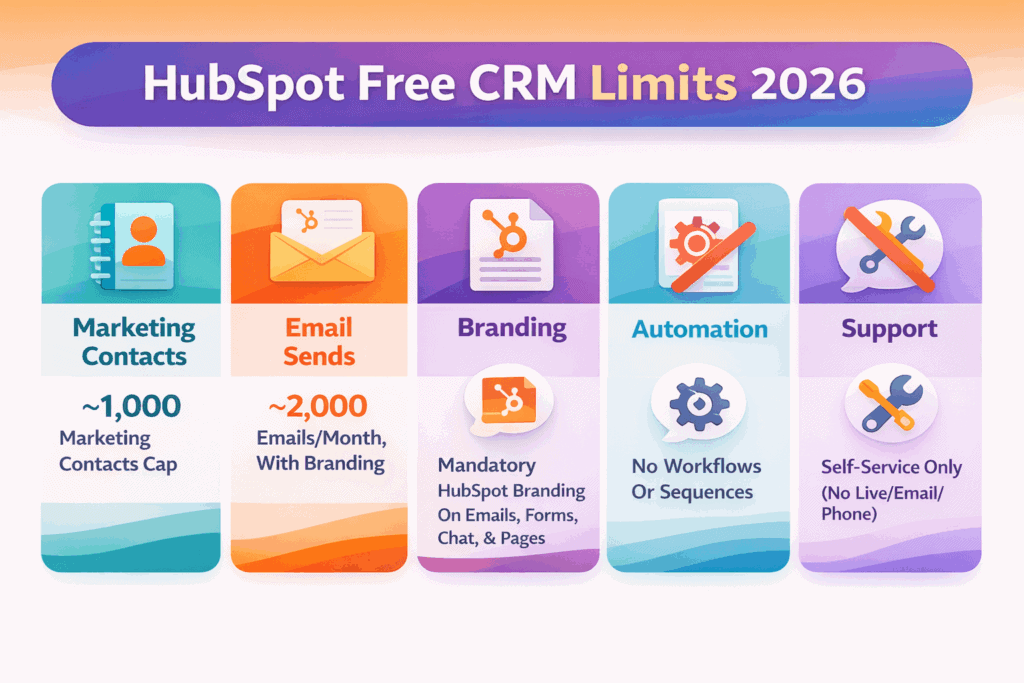
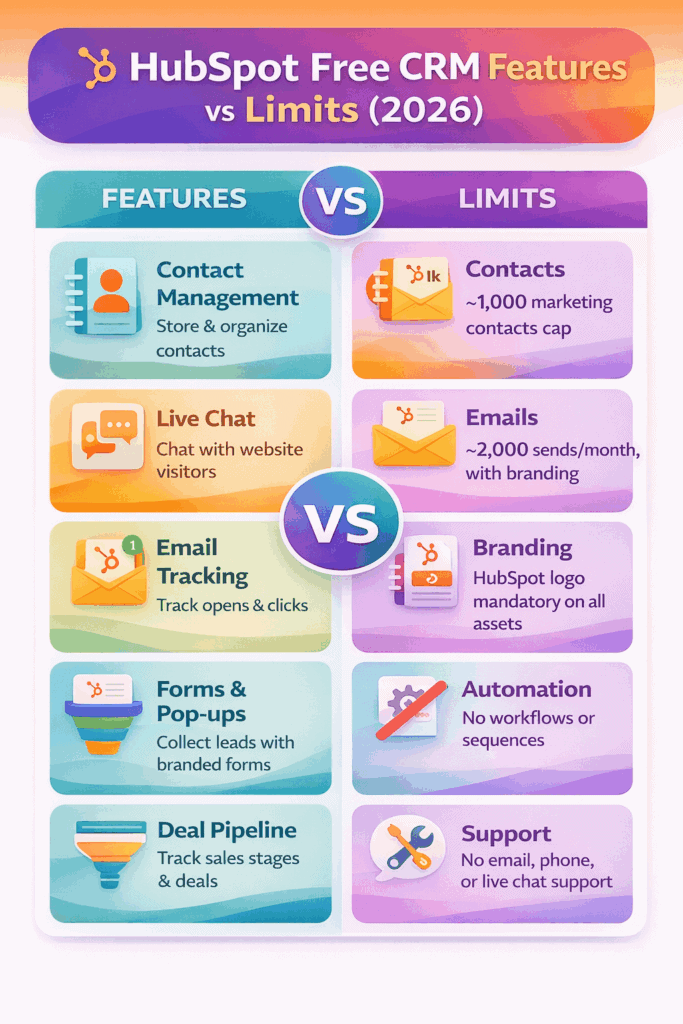
Key HubSpot Free CRM limits in 2026 include:
-
Users: Typically limited to ~2 active users
-
Marketing contacts: Around 1,000 included
-
Email sends: ~2,000 per month
-
Automation: Not included
-
AI features (Breeze): Not included
-
Customer support: Community support only
-
Branding: Cannot be removed on free plan
These limits are the main reason most teams upgrade within weeks—not months.
The Story Behind HubSpot’s Free CRM Plan
HubSpot is now one of the most recognizable names in CRM—but its “free” model didn’t start as generosity.
It evolved as a deliberate go-to-market strategy designed to acquire the right kind of customers and convert them over time.
In the mid-2000s, the CRM market was already crowded. Enterprise giants like Salesforce, SAP, Oracle, Siebel, and PeopleSoft dominated a multi-billion-dollar space, selling long contracts through demos and sales-heavy onboarding. HubSpot wasn’t part of that conversation yet.
In its early days, HubSpot followed the same playbook “Schedule a demo”; and quickly realized it wasn’t working.
Friction was high, adoption was slow, and prospects wanted to experience the product before committing.
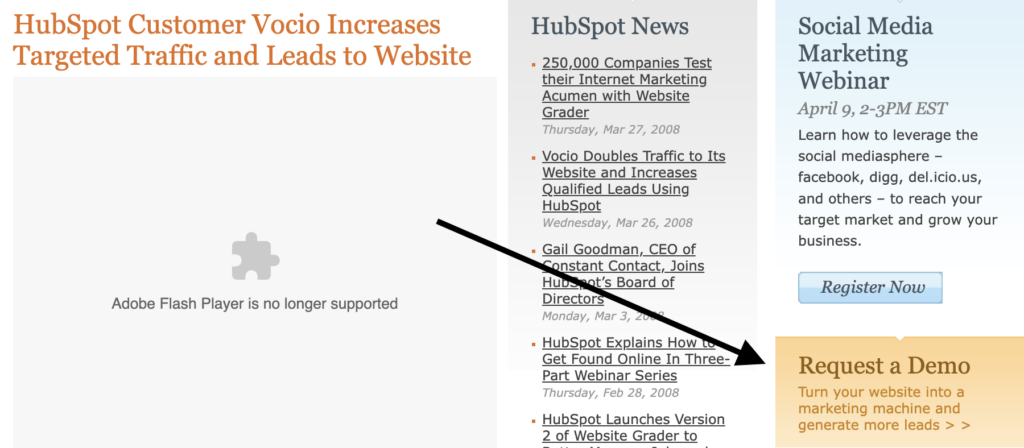
Because the “schedule a demo” lead generation approach wasn’t very effective, HubSpot decided to spice things up in 2009 by asking prospects to try HubSpot free for 7 days.
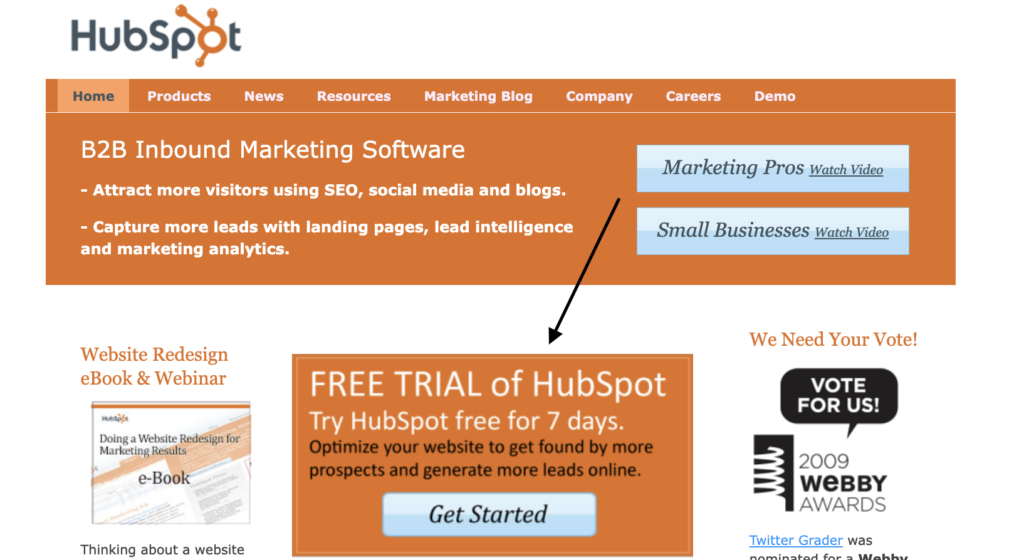
Did this work? Not quite.
So what did HubSpot do? They increased access to their free plan for 30 days.
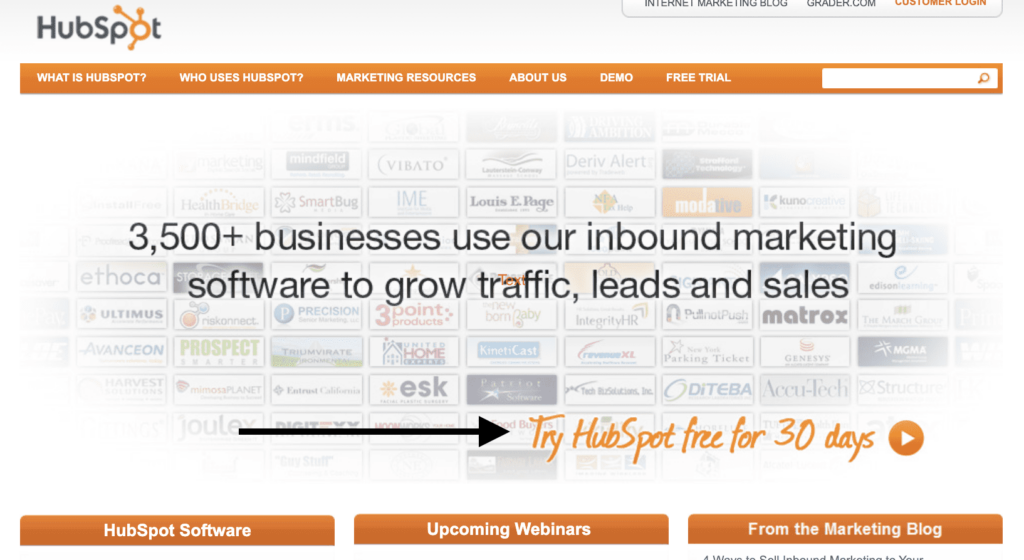
This strategy worked like magic because according to the SEC, HubSpot’s total revenue increased from $28.6 million in 2011 to $51.6 million in 2012 and $77.6 million in 2013.
These were huge growth figures for HubSpot, thanks to their ideal customers which were largely not small businesses, early-stage startups, but B2B businesses with a ton of deep pockets.
How do we know? Well, one of HubSpot’s early free trial sign-up pages says it all.
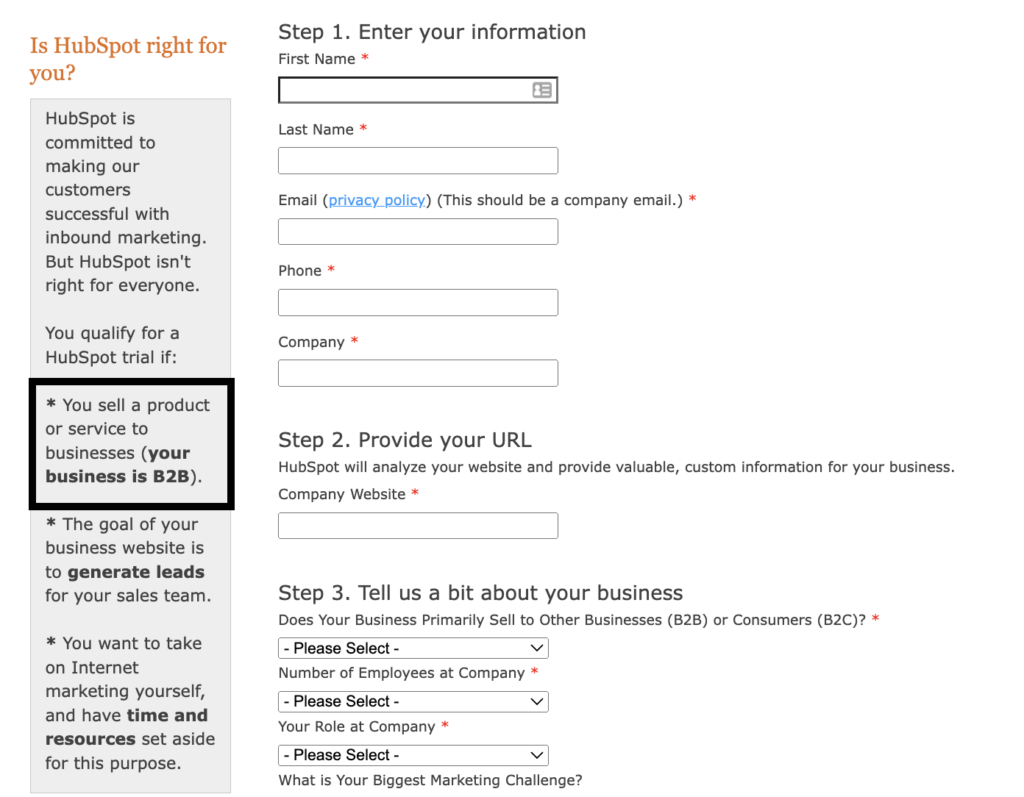
According to HubSpot, one element that qualifies you for a HubSpot trial at the time is this:
👉You sell a product or service to businesses (your business is B2B).
The copy on the sign-up page implies that if you’re not in B2B and you don’t have adequate resources, you don’t qualify for the free trial. Plus, it clearly shows who is best suited for the HubSpot CRM.
HubSpot made this clear because they want to define who they help (majorly B2B businesses).
Also, it doesn’t take rocket science to figure out that the goal of this trial is to convert the free HubSpot user to a paid customer. For sure, upselling isn’t wrong. We do it too.
It’s just that you don’t want a free CRM that becomes too expensive when your business gains steam and you need to upgrade to access more functionalities.
This is what some HubSpot users face today and HubSpot’s free forever plan doesn’t also help.
Take it from Leandro N., the owner of an e-learning company that used HubSpot for 2 long years.
In Leandro’s unfiltered feedback, he says:
“HubSpot is a potentially excellent business suite that is hobbled by its numerous paywalls. Overall, HubSpot has a great starter plan that resembles the software mechanics of “free-to-play” games. The user interface, integrations, email marketing, and contact tracking are all top-notch. As long as your contact list is small, your email marketing frequency is sparse, and you don’t need automations, you are good to go. However, as your business grows, your contact list will swell up, your email marketing frequency will increase, and the sheer scale will make automations a must.
So what is the problem?
Let me give you a quick rundown of the costs involved, using 2,000 contacts as a baseline:
- You can start with HubSpot’s Free CRM (0$ per month)
- Once you need a few features, then you upgrade to the Growth Starter suite, which is $67 per month, or $804 per year.
- Once you need automations, you must upgrade to the professional growth suite, which is currently at $1,253 a month, with a 12-month commitment, and a $3,500 onboarding fee, which means your yearly costs balloon to $18,536.”
You see that cost right there … $18,536.
That’s a boatload of money that’ll make a sizable number of SMBs and early-stage founders absolutely agree with Leandro’s final take on his HubSpot CRM experience.
“I do not think there is any startup or early business that can afford to increase its marketing and CRM suite costs by 2,300%. Most businesses must make the painful decision to abandon HubSpot and find new CRM suites with much more reasonable cost escalations.”
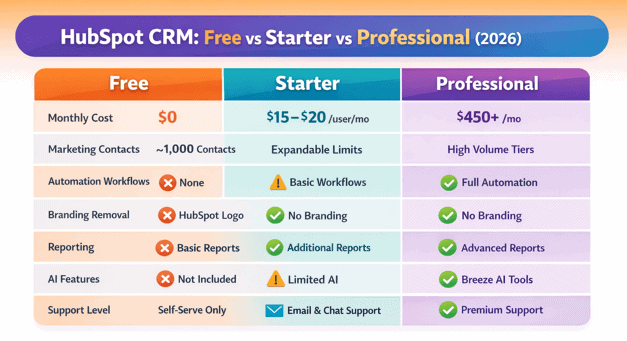
HubSpot Free vs Starter vs Professional (2026 Pricing Overview)
| Feature | Free | Starter | Professional |
|---|---|---|---|
| Monthly cost | $0 | ~$15–$20/user | ~$450+/month |
| Users | ~2 | Paid seats | Multiple seats |
| Marketing contacts | ~1,000 | Starts at 1,000 | Expandable |
| Automation | ❌ | Limited | ✅ |
| Branding removed | ❌ | ✅ | ✅ |
| AI features | ❌ | Limited | ✅ |
HubSpot’s Free and Starter plans may look similar on the surface, but they’re built for very different stages of growth.
Summary of Key Differences: HubSpot Free vs Starter Plan (2026)
HubSpot Free Plan (2026)
The Free plan covers the basics needed to get started:
-
Core CRM for managing contacts, companies, deals, and tickets
-
Live chat and forms with HubSpot branding
-
Email tracking and notifications
-
Basic reporting dashboards
-
Limited email marketing and list segmentation
However, it’s intentionally restricted:
-
No multi-step automation or workflows
-
No custom reports or advanced analytics
-
Strict caps on contacts, emails, dashboards, and usage
-
HubSpot branding cannot be removed
-
Minimal AI functionality
Best suited for: solo users, very small teams, or businesses evaluating HubSpot
HubSpot Starter Plan (2026)
The Starter plan removes many of the early roadblocks and is often the first “real” upgrade:
-
Higher limits on contacts, email sends, and dashboards
-
HubSpot branding removed from emails, chat, and forms
-
Light automation and simple workflows enabled
-
More flexible integrations and app access
-
Email, chat, and phone support from HubSpot
While still limited compared to higher tiers, Starter allows teams to operate more professionally without immediate pressure to upgrade again.
Best suited for: small teams ready to scale beyond the free tier but not yet needing advanced automation
The Practical Difference in 2026
-
Free helps you start
-
Starter helps you operate
The moment branding removal, basic automation, or higher usage limits become necessary, most teams outgrow the Free plan and move to Starter.
The Cost Escalation Reality
A recurring theme among long-term HubSpot users is not that the product is bad—it’s that costs rise faster than most SMBs expect once growth kicks in.
A common journey looks like this:
-
Start on the free CRM
-
Upgrade to an entry-level paid suite to unlock basic features
-
Hit another wall when automation or reporting becomes essential
-
Move into higher tiers with mandatory commitments and onboarding fees
By the time a growing business needs serious automation and multi-hub functionality, annual costs can climb into five-figure territory—often far beyond what early-stage teams budgeted for a CRM.
That experience is echoed by many users who praise HubSpot’s usability and ecosystem but struggle with long-term affordability.
The Core Takeaway
HubSpot’s Free CRM is not a trap—but it is not built for long-term use by growing SMBs.
It works well as:
-
A starting point
-
A testing environment
-
A low-volume CRM for small teams
It becomes challenging when:
-
Contact lists expand
-
Email volume increases
-
Automation becomes non-negotiable
-
AI and reporting move from “nice-to-have” to “essential”
In 2026, HubSpot’s free plan still does exactly what it was designed to do:
Get the right businesses in the door—and monetize growth aggressively afterward.
For some companies, that tradeoff makes sense. For others, it becomes the reason they eventually look elsewhere.
Read also: HubSpot vs MailChimp — A Complete Product Comparison
HubSpot CRM Free Features (2026)
Now that you’ve seen how HubSpot’s free CRM came to be, let’s break down what the free-forever plan actually offers in 2026.
While HubSpot highlights the headline features, many of the practical limits and trade-offs aren’t immediately obvious.
This section looks beyond the marketing copy to explain what you can realistically expect—and where the free plan starts to fall short as your needs grow.
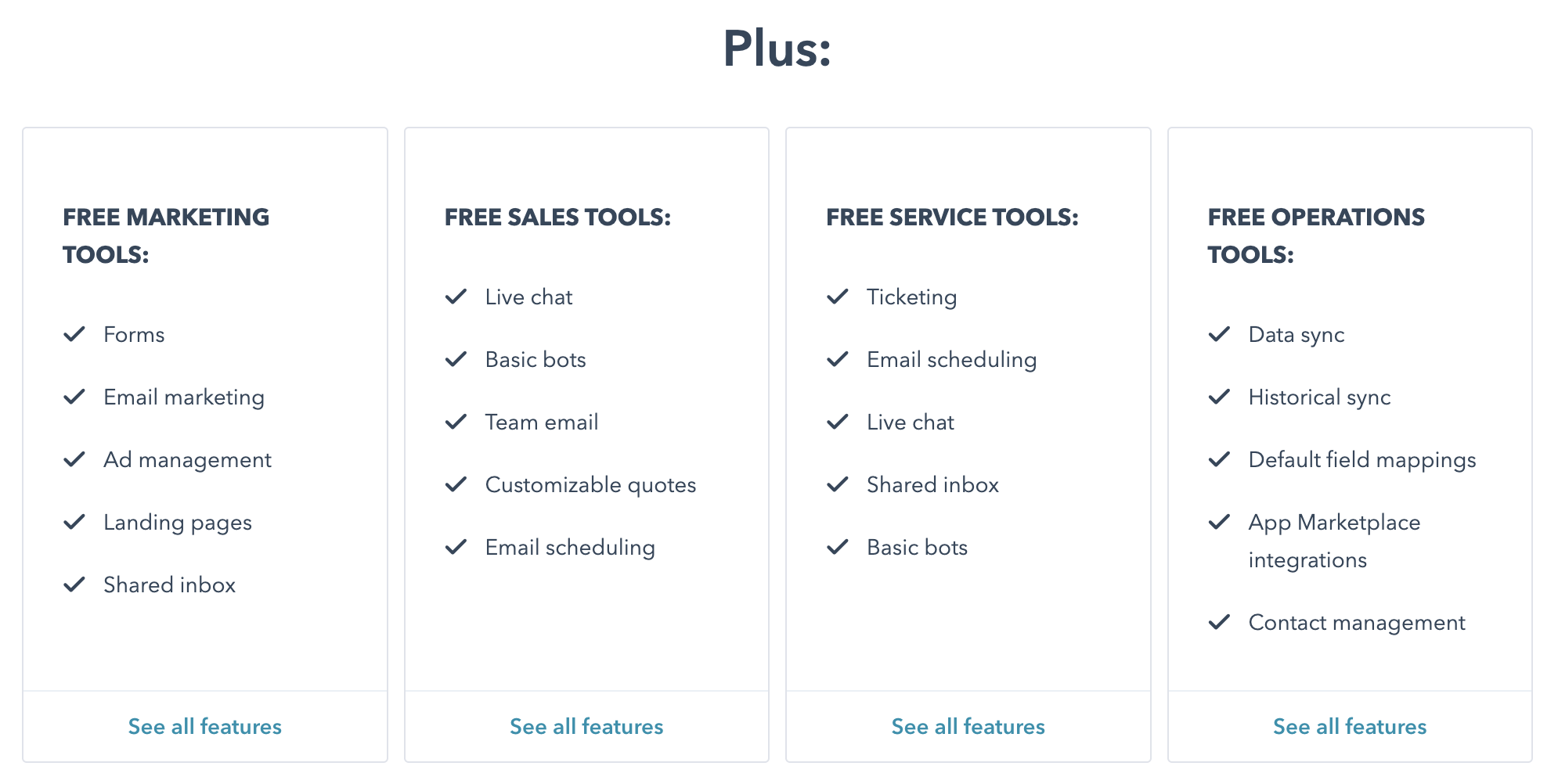
No guesswork needed—we’ve done the heavy lifting and mapped out exactly what HubSpot’s free plan includes in 2026, along with the limitations that matter in real-world use.
We’ll focus on the free CRM features across HubSpot’s most widely used hubs: Marketing Hub and Sales Hub; and then break down the key constraints that typically push teams toward paid plans as they scale.
Here’s what to expect from these hubs:
Free HubSpot CRM Features Across Marketing & Sales Hubs (2026)
HubSpot’s Free CRM includes a shared set of core features across both the Marketing Hub and Sales Hub.
These tools cover basic communication, tracking, and reporting—but with clearly defined limits designed to push upgrades as usage grows.
| Free HubSpot CRM Feature | 2026 Limitations (Free Plan) |
|---|---|
| Shared inbox | Limited to 1 shared inbox per account |
| Live chat | Includes mandatory HubSpot branding |
| Reporting dashboards | Up to 3 dashboards with a maximum of 10 reports per dashboard |
| Facebook Messenger integration | Send and receive basic messages and quick replies only |
| Email tracking & notifications | Basic open and reply tracking only; no advanced engagement insights |
| Email health reporting | High-level deliverability stats only; no AI-driven or optimization recommendations |
Advanced reporting, engagement analytics, and AI-based insights are available only on paid tiers.
Additional Free CRM Features Included in Both Hubs
The following tools are also available on HubSpot’s free plan, with limited customization and scale:
-
Standard custom properties
-
Team email connections
-
Basic chatbots and automation triggers
-
HubSpot mobile apps (iOS & Android)
-
Marketing events object (view and basic tracking only)
-
User management
-
Basic custom user permissions
Important Context for 2026
While these features are genuinely usable for small teams, most advanced capabilities such as deep automation, AI-powered insights, custom reporting, and scalable permissions, these remain locked behind paid plans.
As contact volume, reporting needs, or automation requirements increase, these limits are typically the first friction points users encounter.
Read also: An In-Depth Look At HubSpot vs Pipedrive
Free HubSpot CRM Features in Sales Hub (2026)
HubSpot’s Free CRM includes a slimmed-down version of Sales Hub, designed for basic deal tracking and one-to-one sales communication.
While the tools are usable for individuals and very small teams, most revenue-driving features remain locked behind paid tiers.
| Free Sales Hub Feature | 2026 Limitations (Free Plan) |
|---|---|
| Quote creation | No eSignature, payments, or Stripe integration |
| Email tracking & notifications | Capped monthly notifications |
| Canned snippets | Limited to 5 total |
| Sales documents | Up to 5 documents, all HubSpot-branded |
| Meeting scheduling | One personal booking link; not customizable and HubSpot-branded |
| Deal pipelines | Limited to 1 pipeline per account |
| One-to-one email | Includes HubSpot branding |
| Email templates | Limited to 5 templates |
Additional Sales Tools Included (Free)
The free Sales Hub also includes:
-
Email scheduling
-
Basic Slack integration for deal and activity notifications
What to Expect in 2026
HubSpot’s free Sales Hub works best as a personal sales tracker, not a scalable sales system. The moment teams need:
-
Multiple pipelines
-
Branded outreach
-
Automation or sequences
-
Forecasting or revenue analytics
…an upgrade becomes necessary.
Read also: HubSpot vs SharpSpring — A Side-by-Side Comparison of Key Features
Free HubSpot CRM Features in Marketing Hub (2026)
HubSpot’s Free CRM includes a lightweight version of Marketing Hub, built to help small teams capture leads and send basic campaigns.
While the tools are functional, they’re tightly limited in volume, branding, and automation, making upgrades necessary as soon as marketing activity scales.
Marketing Hub Features Available on the Free Plan
| Free Marketing Hub Feature | 2026 Limitations (Free Plan) |
|---|---|
| Forms (including pop-ups) | Up to ~10,000 form submissions total |
| Email marketing | Up to ~2,000 sends per month with mandatory HubSpot branding |
| Ad management | Limited to 2 connected ad accounts; website audience creation only |
| Landing pages | Up to 20 simple pages hosted on HubSpot subdomains; HubSpot branding required; no custom domains |
| List segmentation | Up to 5 active lists and 1,000 static lists; limited to basic filters (contact properties, form submissions, and email activity) |
| Form follow-up emails | Limited to 1 automated email per form |
| Ad retargeting | Tracked ad spend capped at ~$1,000; supported networks include Google, Facebook, and LinkedIn |
What This Means in Practice (2026)
HubSpot’s free Marketing Hub is best suited for:
-
Capturing early leads
-
Sending occasional branded emails
-
Testing basic forms and landing pages
It quickly becomes restrictive when teams need:
-
Custom domains and branding
-
Multi-step workflows
-
Advanced segmentation
-
A/B testing or AI-powered optimization
At that point, upgrading to a paid Marketing Hub tier is unavoidable.
Read also: Top HubSpot Competitors That Cost a Lot Less
Key Limitations of HubSpot Free CRM (2026)
HubSpot’s free CRM remains one of the most generous free forever CRM offerings on the market with essentials like contact management, email tracking, deal pipelines, and basic marketing tools included at no cost.
However, once a business begins to grow and needs more advanced capabilities, several limitations become clear.
These limits don’t break the product, but they do define how far you can scale without upgrading.
Here’s a clear look at the main constraints of the free plan in 2026; and how they impact real business use.
1. Marketing Contacts Are Limited (Not Truly Unlimited)
Many older guides still claim you can store 1,000,000 contacts for free, but that’s no longer accurate for newer accounts.
Recent experiences from HubSpot users and community discussions indicate that the practical marketing contact limit on the free plan is ~1,000, meaning you can store non-marketing contacts but cannot market to more than ~1,000 without upgrading.
This matters because HubSpot charges based on marketing contacts once you move to a paid Marketing Hub plan.
More marketing contacts = higher subscription costs, and you can’t avoid these charges once you exceed the free limit.
📌 Bottom Line: The free plan’s contact limit might let you hold a large list internally, but you can only actively market to a much smaller number without paying.
2. Support Is Limited to Self-Service Resources
HubSpot does not offer dedicated support (live chat, email support, or phone) to Free CRM users. Instead, you get access to:
-
HubSpot Academy (courses & certifications)
-
Knowledge Base articles
-
Community forums
Paid plans unlock real support channels, which can be crucial for teams that need help interpreting data, fixing setup issues, or troubleshooting workflows.
This limitation often frustrates users who feel stuck or overwhelmed by the platform’s depth—especially when starting out.
3. Email Templates and Snippets Are Very Limited
On the free plan, automated and repeatable communication tools like email templates and canned snippets are tightly restricted.
While you can send one-to-one emails and use a handful of templates, true sales and marketing scaling (e.g., bulk email flows, sequences, and automation) requires paid tiers.
This means:
-
You hit limits quickly as you expand outreach
-
You lose productivity compared to paid competitors
-
Sales teams struggle to manage repetitive touchpoints
4. Basic Document Limits Constrain Sales Enablement
The free plan limits document storage and sharing (e.g., sales collateral, price lists, case studies) to basic, HubSpot-branded files with usage caps.
This slows teams that need to personalize and scale proposals or playbooks without upgrading.
5. Custom Reporting and Advanced Analytics Are Not Included
The native reporting tools on the free plan are straightforward but shallow: you get only a few dashboards with limited report types and no custom reporting or advanced analytics.
Paid plans unlock:
-
Custom reports
-
Advanced funnel and revenue attribution analytics
-
Forecasting tools
Without these, teams can struggle to diagnose performance issues or inform strategy.
6. Seat-Based Model Changes Access Rights
In recent years, HubSpot introduced seat categories like:
-
View-Only seats (free, read-only access)
-
Core seats (paid edit access)
-
Sales/Service Hub seats (paid with extended feature access)
Under this model, many editing privileges once available on the free plan (e.g., modifying records, configuring pipelines) now require at least a paid Core seat.
This is a shift from the earlier open-access model and means that as teams grow, they must budget for seat licenses, not just plan upgrades.
HubSpot Free CRM: Key Limits at a Glance (2026)
| Feature / Capability | Free Plan Limitation |
|---|---|
| Marketing contacts | ~1,000 contacts eligible for marketing without upgrade |
| Support | Self-service only (Academy, forums, knowledge base) |
| Email templates & snippets | Very limited; advanced sales automation locked behind paid plans |
| Custom reporting | Basic dashboards; no custom reports on free |
| Seat access | Edit rights often require paid seats (Core Seats) |
| Automation | No workflows or sequences; requires paid tiers |
| Branding | HubSpot branding on emails, forms, chat widgets |
How These Limits Impact Growing Businesses
These limitations aren’t necessarily deal-breakers for very small teams or single users.
In fact, HubSpot’s free plan still ranks as one of the most generous free CRM options for small businesses in 2026, with essentials like contact and deal management, email tracking, and basic sales/marketing tools included.
However, when growth happens, the free plan quickly bumps into pain points:
-
You can’t market at scale without paying for contacts
-
You can’t automate follow-ups or workflows
-
You lack robust analytics and insight tools
-
You gain no hands-on support
For teams ready to scale, upgrading to a paid Starter or higher tier becomes almost inevitable.
Is HubSpot Really Free? Uncovering the Hidden Costs”
Read also: HubSpot Pricing and Comparison with Other Alternatives
Should SMBs and Early-Stage Startups Use HubSpot Free CRM in 2026?
The short answer in 2026: yes—to start, but not to scale.
HubSpot’s Free CRM can be a solid entry point for small teams that are just getting organized.
It works well for managing a small contact list, tracking deals, responding to live chat, and getting basic visibility into sales activity—all without upfront cost.
However, SMBs and early-stage startups don’t all grow the same way.
Some rely heavily on inbound and outbound sales motion, layered campaigns, and structured follow-ups.
Others win business by responding fast on live chat or email and keeping conversations simple.
Because growth paths differ, HubSpot’s free plan fits some teams better than others.
In 2026, the key question isn’t “Is HubSpot Free usable?”
Well, it is.
The real question is “How long will it stay usable for your business model?”
For teams with low contact volumes and minimal automation needs, the free CRM can work for months or even longer.
But for startups that scale marketing, email outreach, or sales operations quickly, the free plan becomes restrictive fast, and upgrades become unavoidable.
Used intentionally, HubSpot Free CRM is a starting line, not a long-term destination.
Read also: 9 Amazing Marketing Automation CRM Software [Comparison Table]
Who Is HubSpot Free CRM Best For in 2026?
HubSpot’s Free CRM isn’t a one-size-fits-all solution. In 2026, it works best for very specific business profiles and becomes restrictive quickly outside those lanes.
Below is a realistic breakdown of who the free plan fits well, and who should start looking at alternatives early.
1. Small businesses with low customer interaction
If your business communicates with customers only occasionally and doesn’t rely heavily on email tracking, automation, or campaigns, HubSpot Free can be sufficient.
That said, tracking limits matter. Email open and reply notifications are capped, so even modest lists can hit ceilings faster than expected.
Once you exceed those limits, visibility drops unless you upgrade.
Best fit:
-
Local or service-based businesses
-
Low-volume outreach
-
Minimal follow-ups
Not ideal if: email tracking and engagement data drive your sales decisions.
2. Product-led or self-service SaaS companies (early stage)
Product-led SaaS businesses where users sign up, trial, or convert without sales involvement can make use of HubSpot Free as a lightweight contact and activity tracker.
In 2026, however, marketing contact limits apply, so the free plan works only if:
-
You’re tracking users, not actively marketing to them at scale
-
Email sends and segmentation are minimal
Once onboarding emails, lifecycle campaigns, or behavior-based automation become essential, the free plan runs out of road quickly.
3. Businesses without a dedicated sales team
Very small teams that close a handful of deals per month—and don’t need multiple pipelines, automation, or forecasting—can use HubSpot Free as a simple sales tracker.
However, even basic sales tasks like reusable quotes, branded documents, or scalable follow-ups are limited. Manual work piles up fast as deal volume increases.
Best fit:
-
Founder-led sales
-
Low deal velocity
-
Simple pricing models
Not ideal if: quoting, pipelines, or follow-ups are frequent.
4. Beginner freelancers and solo consultants
For freelancers and consultants just getting started, HubSpot Free offers a clean way to manage contacts, schedule meetings, and track basic conversations.
But as soon as you:
-
Launch newsletters
-
Run lead magnets or courses
-
Segment audiences
-
Create multiple email templates
…you’ll exhaust the free limits quickly and face upgrade pressure.
The 2026 Reality Check
HubSpot Free CRM works best when:
-
Contact volumes are small
-
Automation isn’t critical
-
Branding limitations are acceptable
-
Growth is slow or intentional
It becomes frustrating when:
-
You scale email or sales activity
-
You need automation, reporting, or AI insights
-
You want predictable costs as you grow
In short, HubSpot Free CRM is a strong starting point—but a poor long-term home for fast-growing SMBs and startups.
Marketing Madness: HubSpot vs EngageBay Face‑Off
Read also: HubSpot Pros And Cons — A Candid Assessment
Who Should Avoid HubSpot Free CRM in 2026?
HubSpot’s Free CRM is useful—but only within narrow boundaries.
If your business falls into any of the categories below, the free plan is more likely to slow you down than help you grow.
Let’s be clear about who should think twice.
1. SaaS businesses with a sales-led (non-self-serve) model
If your SaaS relies on sales reps to qualify leads, run demos, follow up, and close deals, HubSpot Free will feel restrictive very quickly.
In 2026, the free plan lacks:
-
Sales sequences and automated follow-ups
-
Workflow-based task creation
-
Multiple pipelines and forecasting
-
Scalable reporting for sales performance
This often leads teams to upgrade earlier than planned—or migrate later, after data, workflows, and habits are already locked in.
That migration cost (time, training, disruption) is where many early-stage teams get burned.
The issue isn’t that HubSpot is bad—it’s that the free plan isn’t designed for sales-driven growth.
2. SMBs with clear, aggressive growth plans
If you already know you’re going to scale marketing, sales, or outreach in the next 6–12 months, HubSpot Free is rarely a smart long-term choice.
Why?
-
Starter plans remove some friction but still feel constrained
-
Meaningful automation, reporting, and scalability sit in higher tiers
-
Costs jump quickly as contacts, seats, and usage grow
Many teams discover that the real HubSpot experience starts only after crossing into higher plans; at which point annual costs can escalate sharply.
If predictable costs matter to your business, this is a red flag.
3. Businesses building or expanding a sales team
The moment you introduce multiple sales reps, HubSpot Free begins to crack.
Sales teams on the free plan can’t:
-
Trigger actions when deals move stages
-
Personalize multiple meeting links
-
Use e-signatures or payment-enabled quotes
-
Run scalable outreach without hitting limits
Manual work piles up, performance tracking suffers, and managers lose visibility.
In practice, most teams in this situation are forced to jump beyond Starter and into higher tiers to operate efficiently.
At that point, the “free” entry becomes irrelevant.
4. Teams that need fast, hands-on customer support
HubSpot Free users do not get 1:1 support.
No live chat.
No email support.
No phone assistance.
You’re limited to documentation, community forums, and self-service learning.
That’s fine when everything works—but when it doesn’t, resolution can take time.
For businesses where delays directly impact revenue, support access isn’t optional.
Every hour spent troubleshooting software is an hour not spent closing deals.
The 2026 Bottom Line
You should avoid HubSpot Free CRM if:
-
Sales is core to your growth model
-
You plan to scale quickly
-
You’re building a sales team
-
You need reliable support
-
You want predictable, SMB-friendly pricing
HubSpot Free is a testing ground, not a growth platform.
If you’re serious about scaling and want fewer surprises as you grow, it’s worth considering CRM alternatives built specifically for SMBs from day one.
Read also: 8 Surprisingly Awesome HubSpot Alternatives
TL;DR — Is HubSpot Free CRM Worth It in 2026?
Short answer: Yes, to start. No to scale.
- ✅ Strong starting point
Ideal for small teams that need basic contact and deal management, live chat, forms, email tracking, and simple reporting—without upfront cost. - ⚠️ Strict built-in limits
Marketing contacts are capped (~1,000), automation workflows and sales sequences aren’t included, and support is self-serve only. - 🚫 Branding is non-negotiable
All customer-facing assets—emails, forms, chat widgets, and landing pages—carry HubSpot branding on the free plan. - 💸 Costs climb quickly with growth
Starter plans remove branding and unlock light automation, but meaningful automation, reporting, and scalability require higher tiers with contact-based pricing that rises fast. - 🤝 Fit depends on your growth path
For freelancers, solopreneurs, and very small teams with simple CRM needs, HubSpot Free offers real value. For businesses planning to scale sales, marketing, or automation in 2026, the free plan is a temporary stop—not a long-term solution.
The HubSpot CRM Alternative That Does More for Less
HubSpot is truly one of the pioneers in the CRM space.
While they have a great free forever plan, the truth is, the free plan limitations are way too much.
The ceiling on email templates, absence of automation, zero support for free plan users, inability to personalize the CRM experience for your customers, and of course, huge costs of upgrading are real bottlenecks.
Have we mentioned that you pay a $3,500 HubSpot onboarding fee when you decide to upgrade?
These and more are challenges that you won’t find with a HubSpot alternative like EngageBay CRM. EngageBay will not ask you to pay a dollar to get onboarded.
Take it from Kamran R. who used multiple CRMs before finding EngageBay.
“Overall, EngageBay is really an alternative to HubSpot and Agile CRM. It has been a great experience and the onboarding is super easy.
I tried several CRMs which include ZOHO CRM PLUS, AGILE ENTERPRISE, and HubSpot for a while. Most CRMs have the same functionalities but when it comes to pricing, it’s way different. EngageBay has everything that Agile, ZOHO, and HubSpot have but at a fraction of the cost. When you are running a digital business you probably have thousands of leads or contacts who you want to nurture and with limited contacts, you can’t do miracles.
EngageBay has given me unlimited storage of contacts and I can send 50,000 emails a month without connecting to any other email app like Sendgrid or Mailchimp.
Another thing is support, their 24 hours support is awesome and the team is also cooperative as well. Therefore, you should try this since it has everything which a high-end CRM has but at a fraction of the cost.”
Like Kamran, many other EngageBay customers switched from other CRMs.
An example is Pierpaolo V, who has used EngageBay for almost 12 months.
“I’ve tried EngageBay but now it’s our official automation platform. I tried other platforms and spent a lot of money assessing them (HubSpot, Sharpspring, ActiveCampaign, etc).
Some of them have too high prices, others don’t seem to listen to the request for new features, still others the support is slow to respond. In all the cases I tried something was missing: for EngageBay, nothing is missing and the costs are very affordable (it also includes a free version to let my customers try the product).
EngageBay is quick and easy to use. It has everything we need (integration, mail automation, sales automation, lead generation, Android and Ios apps, support ticket e-chat for visitors, etc…)”
If you want a CRM that’s not just affordable but has a ton of easy-to-use features, then you should try EngageBay’s free forever plan.
EngageBay vs HubSpot
EngageBay offers you 24/7 access to the customer support team, we don’t lock you into a contract, and all the advanced features that’ll make you win as a business owner or founder are right in our CRM.
Conclusion
So—is HubSpot free in 2026?
Yes—but only at a very basic level. HubSpot Free CRM works well for trying things out, but serious growth requires upgrading to paid plans sooner than most users expect.
Before committing, it’s worth comparing CRM platforms that offer more flexibility, automation, and value without steep upgrades.
Read our full breakdown of HubSpot vs EngageBay
Related reading:
- The best CRM Tools for Small Businesses
- The 14 Best CRM Automation Software in 2024
- 15 Best Marketing Automation Tools for Small Businesses
- Is HubSpot Worth It? In-Depth Review for Small Businesses
HubSpot Free CRM FAQs (2026)
Q1: Is HubSpot CRM completely free?
Yes, HubSpot offers a free CRM plan—but advanced features require paid upgrades.
In practice, HubSpot Free supports around 2 active users before limitations appear.
Yes, but it’s limited to roughly 2,000 email sends per month with branding.
No. Branding removal requires a paid plan.
It’s good for testing—but most small businesses outgrow it quickly.

